

Thinkific gives you a built-in video player that works. Spotlightr gives you a video hosting platform built to protect your content, engage your students, and grow your course business. If you’re serious about selling online courses, the differences between basic hosting and dedicated video hosting matter more than most course creators realize.
Below is a detailed comparison of Thinkific’s native video hosting versus Spotlightr’s purpose-built video hosting, covering security, analytics, branding, performance, pricing, and integration.
Thinkific Built-in Video Hosting vs Spotlightr: Key Differences
The core decision here is whether Thinkific’s included video capabilities are enough for your course content, or whether upgrading to a dedicated video hosting platform like Spotlightr delivers measurable advantages worth the investment.
Thinkific is a comprehensive Learning Management System focused on course creation. It’s designed for creators who want an all-in-one solution for courses – a course builder, payment processing, student management, and basic hosting bundled together. Video hosting is part of the package, not the focus. Thinkific allows unlimited video hosting with a 2GB size limit per video, and videos can be uploaded at lesson level or via bulk importer. The video features serve pure course delivery adequately for many beginners.
Spotlightr is a dedicated video hosting platform focusing on high-quality streaming. Every feature – from security to analytics to player customization – is designed specifically for course creators and video-driven businesses. Spotlightr provides superior video performance with advanced security features that go far beyond what most course platforms offer natively.
Why do course creators consider third-party video hosting for their Thinkific courses? The reasons typically come down to three gaps: protecting paid courses from piracy, getting detailed analytics to improve student engagement, and delivering a branded, professional video experience that matches the price tag of premium video courses.
Both approaches can produce functional courses. But the experience they deliver – for your students and for your ability to optimize and protect your business – differs significantly.
Video Security and Protection
If you’re selling paid courses, video security isn’t optional. Every pirated copy of your course is lost revenue. Every shared login undermines your pricing. The level of protection your video hosting provides directly affects your bottom line.
Thinkific Built-in Video Hosting Security
Thinkific’s video security relies on Wistia’s streaming infrastructure and does not offer any DRM protection or download prevention features. There is no forensic watermarking, no dynamic visible watermark showing a viewer’s email or IP, and no screen-recording deterrent.
Thinkific does have some access control like ‘right-click’ protection and the ability to disable any download buttons in the controls, but without any encryption, DRM protection, or watermarking, it leaves video content vulnerable to content scraping and casual piracy.
For free courses or low-stakes content, this level of protection is fine. For premium course content priced at hundreds or thousands of dollars, the gaps become expensive.
Spotlightr Video Security Features
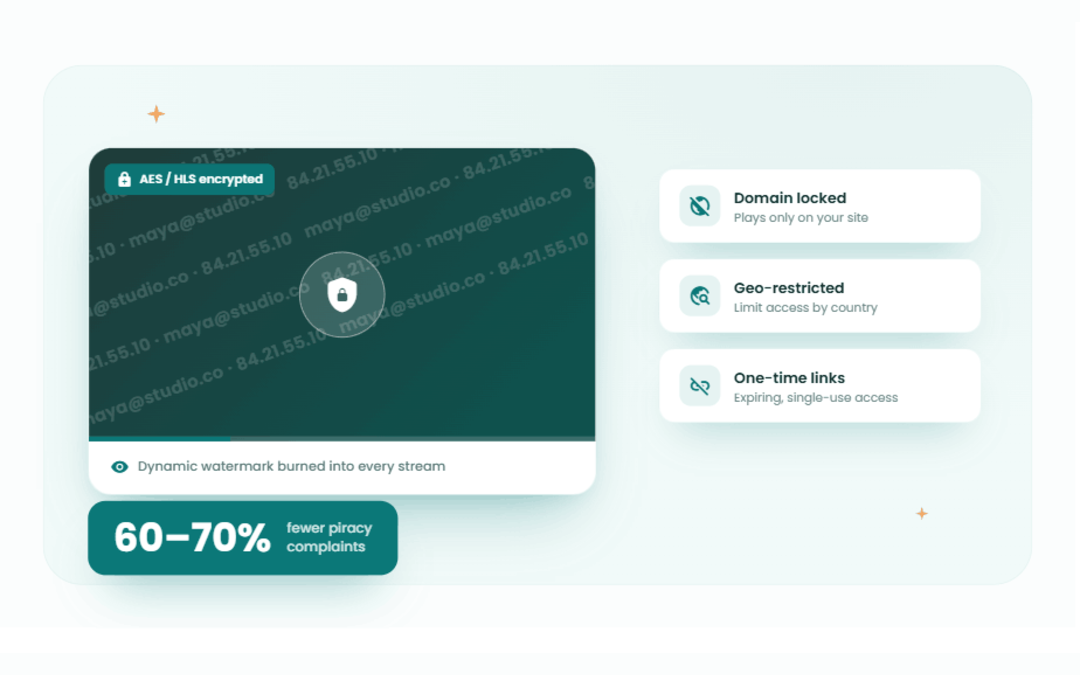
Spotlightr treats security as a core feature, not an afterthought. Video security features in Spotlightr include AES/HLS encryption and dynamic watermarking – every video uploaded directly to Spotlightr is encrypted by default. Even if someone uses browser extensions to scrape the file, they cannot produce a usable video.
Beyond encryption, Spotlightr provides enterprise grade security through multiple layers:
– Domain restrictions so videos only play on whitelisted domains
– Password protection with custom access controls
– Dynamic IP and email watermarking burned into the video stream
– .Geo-restrictions to restrict access by country
– Time-limited and one-time access links
– Ability to disable forward-seeking to prevent skipping
Spotlightr reduces piracy complaints by 60-70% for course creators. For anyone selling high-value membership sites or premium video courses, that reduction translates directly into protected revenue.
Analytics and Student Engagement Tracking
Knowing that students watched a video isn’t enough. You need to know where they stopped, what they rewatched, and what they skipped – so you can improve your content and boost student engagement.
Thinkific Video Analytics
Thinkific offers basic analytics for video engagement tracking through its Video Engagement Reporting feature, available on Grow plans and above. You get high-level metrics: total loads, total plays, hours watched, unique visitors, and average engagement percentage per video.
These numbers tell you whether students are watching, but offer limited insights into drop-off points and engagement patterns. You don’t get second-by-second heatmaps or individual student viewing timelines. The data integrates with Thinkific’s overall course analytics – lesson completion rates, quiz scores – but video-specific data remains shallow.
Reports also update with a delay, which slows iteration. Sufficient for basic course monitoring, but if you’re trying to optimize a $500 course for maximum completion rates, you need more depth.
Spotlightr Advanced Analytics
Spotlightr offers advanced analytics for viewing habits and engagement tracking that go well beyond surface-level metrics.
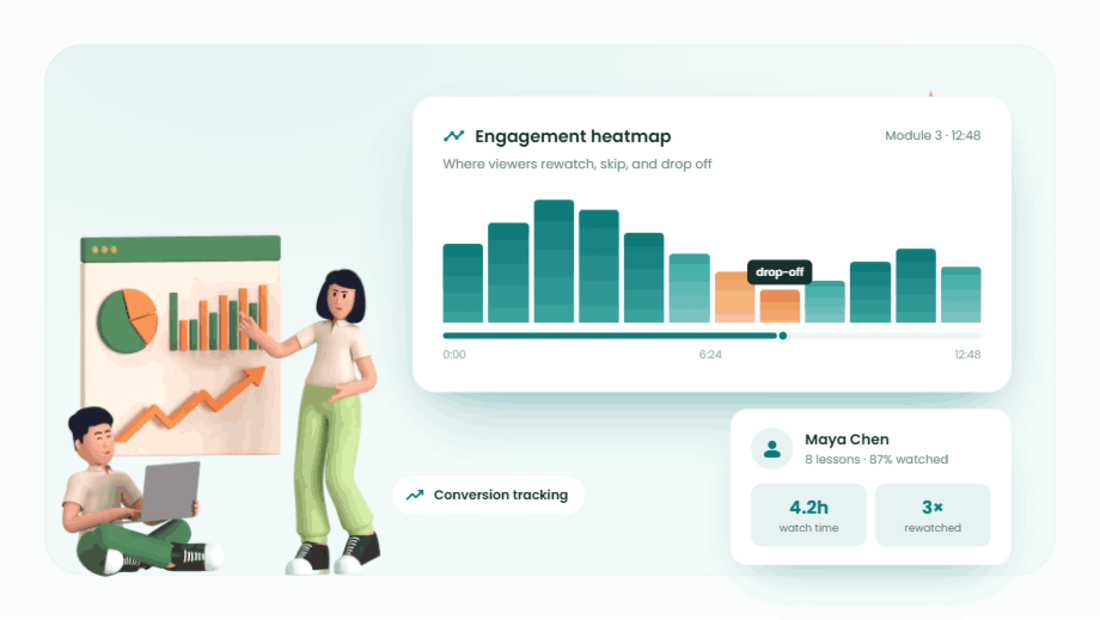
Detailed video heatmaps show exact engagement drop-off points across an entire course or lesson – you can see precisely where students lose interest, rewind, or re-watch at specific timestamps. Individual student viewing behavior and watch time analytics let you track engagement per person, not just in aggregate. Each student gets a detailed student profile with complete viewing history, giving you detailed viewer level analytics across all your spotlightr videos.
Conversion tracking connects video interactions to course actions and purchases, so you know which videos drive sales. Wistia provides detailed viewer-level analytics and heatmaps as well, but Spotlightr bundles these capabilities with security and engagement features that Wistia doesn’t match for course-specific use cases.
Spotlightr also supports triggering automations via Zapier or direct CRM integration at the exact moment a student reaches or abandons a section – connecting your video data to your email marketing and lead generation workflows.
Video Quality and Performance
Buffering kills course completion rates. If students experience lag, slow loads, or poor video quality, they disengage – regardless of how good your content is.
Thinkific Video Performance
Thinkific delivers standard HD video support through Wistia’s content delivery network. Adaptive streaming is available via HLS, which adjusts resolution based on the viewer’s connection. For most students on decent internet, playback is solid.
However, Thinkific enforces a 2GB per video file size limit, which can force creators to compress or split longer, higher-resolution content. Bandwidth caps on lower-tier plans – starting at 100 GB/month on basic – may become bottlenecks for creators with large video libraries or growing student bases. Some user feedback indicates occasional buffering issues during high traffic periods or on lower-quality networks.
Spotlightr Video Optimization
Spotlightr supports up to 4K UHD resolution with multi-bitrate adaptive streaming, delivering exceptional video quality regardless of connection speed. Videos are served through a global CDN network optimized specifically for course video delivery, resulting in high quality playback with fast load times and minimal buffering.
TechRadar’s review of top video hosting platforms praised Spotlightr for smooth playback, fast load times, and fewer buffering incidents compared to general-purpose hosting solutions. For context, while platforms like Vimeo support video resolutions up to 8K HDR, Spotlightr’s optimization is purpose-built for the course delivery use case – where consistent, reliable streaming matters more than raw resolution specs.
Advanced video encoding ensures faster load times without sacrificing quality, and Spotlightr’s infrastructure maintains high uptime with enterprise-grade reliability.
Video Player Customization and Branding
Your video player is the most-viewed element of your entire course. If it looks generic, your course feels generic. Customizable video players enhance branding and user experience, and that directly affects perceived course value.
Thinkific Video Player Options
Thinkific offers a standard player with limited customization options. Thinkific’s video player can be customized to match brand colors, and you can apply custom CSS on paid plans to adjust some visual elements. But Thinkific does not offer advanced video customization options compared to dedicated platforms.
The player layout and control positioning are fixed. Full logo overlays on videos, custom overlays in the timeline, or interactive elements within the video itself are not standard built-in features. The player integrates seamlessly with Thinkific course themes, which maintains a consistent look across your course site – but offers limited uniqueness compared to what a flexible video hosting solution can provide.
Spotlightr Custom Video Players
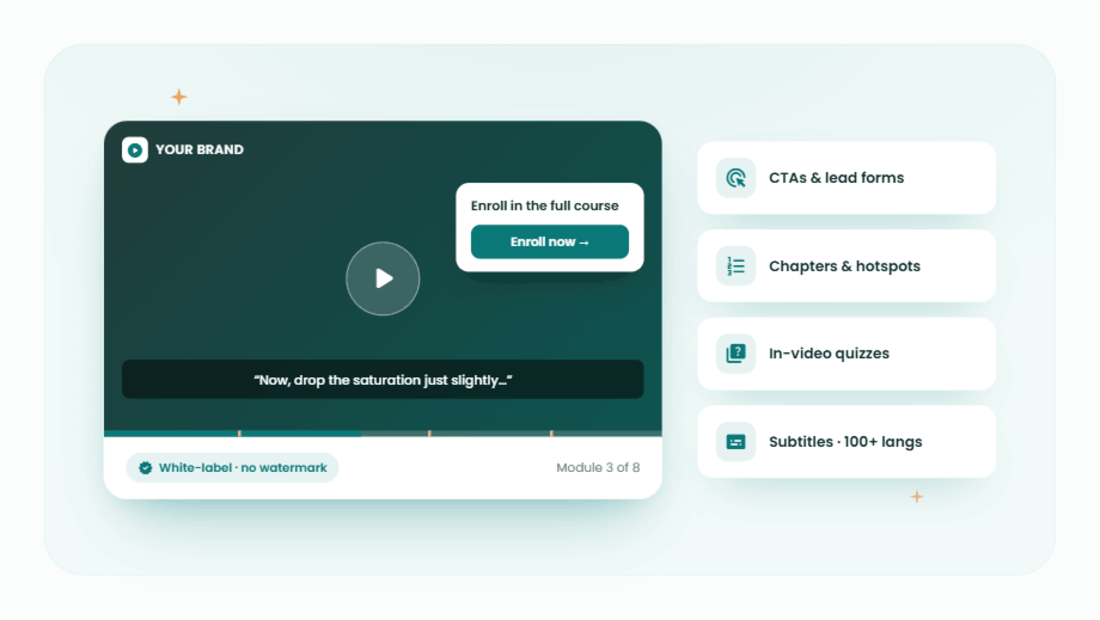
Spotlightr provides a professionally branded ad-free player for video on every plan. You get fully white-labeled players with custom logos, colors, and branding – no Spotlightr watermark, no third-party branding, just your course identity.
The customization goes deeper than aesthetics:
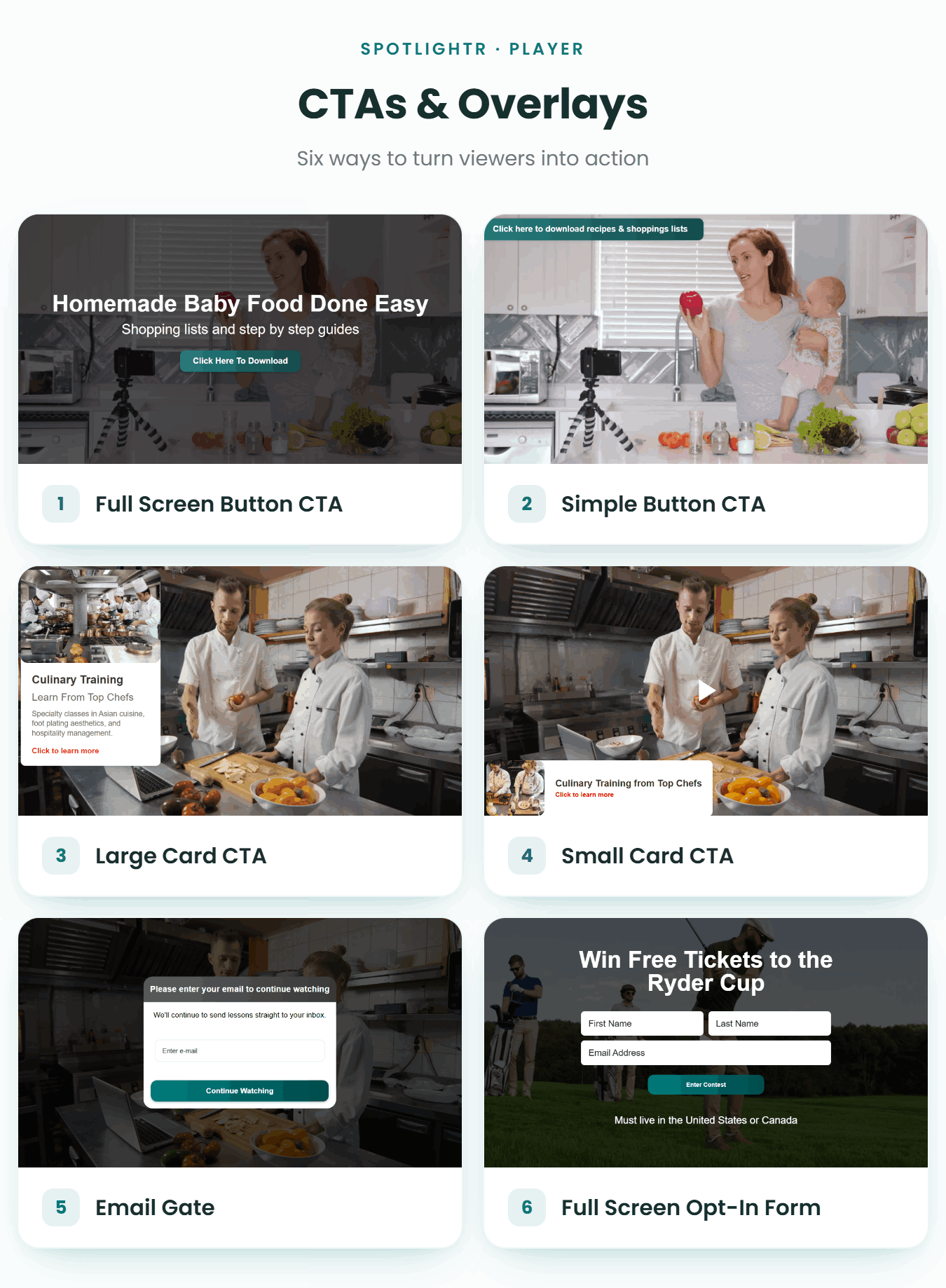
– Interactive elements like CTAs, lead capture forms, and in-video quizzes
– Custom start and end screens with branded messaging
– Video chaptering for easy navigation through longer lessons
– Hotspot overlays and clickable elements within the video timeline
– Subtitles and searchable transcripts in 100+ languages
– Multiple player themes and layout options for different course styles
These interactive features turn passive video watching into active engagement. Instead of just playing a video, your player becomes a marketing and teaching tool – allowing creators to capture leads, reinforce branding, and guide students through course content with more control over the experience.
Pricing and Value Comparison
The cheapest option isn’t always the most cost-effective. When evaluating platforms, you need to consider what each dollar actually delivers – and what gaps in basic hosting might cost you in lost revenue.
Thinkific Video Hosting Costs
Thinkific charges a flat monthly fee starting at $99/month, with video hosting included in all subscription plans. There’s no additional monthly fee for basic video hosting and storage, which makes the pricing structure straightforward.
However, lower-tier plans come with tighter bandwidth limits and the 2GB file size restriction. As your video library grows, you may hit limits that force plan upgrades. For creators on a tight budget who are just starting out or creating courses to test the market, the bundled approach keeps costs predictable – but the value depends entirely on whether you’re satisfied with basic video features and functionality.
Spotlightr Investment and ROI
Spotlightr pricing starts at $15/month (or $150/year) for the Light plan, which includes 50 GB storage, 200 GB bandwidth, HLS encryption on all videos, and full player branding. The Plus plan at $25/month (or $250/year) increases storage and bandwidth, while Premium and Scale tiers expand advanced tools and team features.
Yes, Spotlightr represents an additional monthly cost beyond your Thinkific subscription. But when you factor in what that investment delivers – reduced piracy (60-70% fewer complaints), better student satisfaction from improved playback, in depth analytics that help you optimize course performance, and a branded experience that justifies premium pricing – the ROI becomes clear.
For creators aiming to build a serious course business, the question isn’t whether you can afford Spotlightr. It’s whether you can afford the revenue leakage, student drop-off, and brand dilution that come from relying on basic hosting alone.
Integration and Setup Process
Switching video hosts sounds complicated. In practice, connecting Spotlightr to Thinkific is straightforward – and you don’t have to abandon Thinkific’s course infrastructure to get better video.
Using Thinkific’s Built-in Video Hosting
Thinkific’s built-in hosting is seamless. Upload videos directly through the video library or as lesson content – they’re immediately available in the course builder. Progress tracking and completion work automatically. No external accounts, no embed codes, no additional technical configuration needed.
Thinkific is user-friendly and enables quick course building, and for creators who want simplicity above all else, the native approach has appeal. But you’re limited to Thinkific’s video capabilities, which as we’ve covered, leave significant gaps in security, analytics, and customization.
Integrating Spotlightr with Thinkific
Spotlightr allows for embedding into platforms like Thinkific for enhanced analytics. The process is simple: upload videos to Spotlightr, configure your player settings and security, generate embed codes, and paste them into Thinkific’s lesson builder.
Spotlightr integrates with Thinkific and Teachable via API, and the setup is typically one-time per video. When you need to update a video, Spotlightr allows replacing the source file without changing the embed – so your Thinkific lessons stay intact. All advanced features – encryption, watermarking, custom player, CTA overlays, detailed analytics – work fully in embed mode.
You will be managing videos across two platforms, which adds a step to your workflow. But many successful course creators report that Spotlightr’s support team assists with Thinkific integration for a smooth transition, and the ongoing benefits – better security, richer data, professional branding – far outweigh the minor additional workflow.
Which Video Hosting Solution Should You Choose for Your Thinkific Course?
If you’re offering a free option, testing course ideas, or operating on a tight budget with no immediate need for advanced features, Thinkific’s built-in hosting handles the basics. It’s included, it’s simple, and for low-stakes content it works.
If you’re selling premium video courses, running membership sites, or building a course business where revenue depends on protecting and optimizing your video content, Spotlightr is the right video hosting platform. The combination of secure video hosting, detailed analytics, fully branded players, and interactive tools delivers measurable improvements in course performance, student retention, and content protection.
The investment in Spotlightr pays off through better course completion rates, reduced piracy, stronger branding that supports premium pricing, and analytics that show you exactly how to improve your content. Advanced analytics help track student engagement and video performance in ways that generic learning management systems simply cannot match.
Many successful Thinkific course creators start with built-in hosting and upgrade to Spotlightr as their business grows – transitioning premium content first, then expanding across their catalog. That hybrid approach lets you move at your own pace while immediately protecting your most valuable course content.
When the best video hosting for your courses needs to do more than just play a file, Spotlightr delivers
Spotlightr Video Hosting For Your Course
Discover why Spotlightr is the #1 choice for course creators and e-learning professionals.
Register for a free 2 week trial, no credit card required.

Bill is the founder of Spotlightr, a video platform used by course creators, membership sites and marketers who need their video hosted properly rather than uploaded somewhere and hoped for. He writes about instructional video from the inside — what creators actually publish, where students actually stop watching, and what the platforms in this category actually charge. He’s currently building Spotlightr Courses, a course product built around the video rather than bolted on top of it.