

If you sell courses, run a membership site, or distribute training videos, there’s a good chance someone has already tried to download your content. HLS encryption changes that equation entirely-turning your video library from an easy target into a stream of encrypted segments that are useless without the right key — as long as the key itself is protected.
Key Takeaways
– HLS encryption uses AES-128 encryption to scramble each segment of an HLS stream, converting video into an unreadable format that cannot be played without the correct decryption key.
– While HLS encryption alone is not full digital rights management, combining it with domain locks, tokenized key URLs, and watermarking stops the vast majority of casual piracy.
– Spotlightr includes real DRM (Widevine and FairPlay) on every plan at no extra cost. DRM protects playback wherever the device supports it; Force DRM blocks playback everywhere else.
– Below, you’ll learn how HTTP live streaming encryption works, common encryption methods, key delivery strategies, implementation steps, and how Spotlightr handles all of this for non-technical users.
What Is HLS Encryption (In Plain English)?
HTTP live streaming is Apple’s adaptive streaming protocol, introduced around 2009 and now the industry standard for video delivery across iOS, macOS, Android, and most web browsers. HLS is widely adopted for secure video content delivery because it supports both live and on-demand video content, breaking a single video file into many small chunks and serving them sequentially over standard HTTPS connections.
HLS encryption is the process of scrambling each of those video segments using the AES-128 standard so that the encrypted content is completely useless without the matching encryption key. An HLS stream consists of manifest files (M3U8 playlist files, which are essentially text files) plus many small media files-typically 2–10 seconds each. HLS uses an authorized manifest file (.m3u8) to deliver these encrypted segments from protected video files to the player.
Unlike full digital rights management systems such as Widevine or FairPlay, HLS encryption is a lighter-weight, transport-level form of content protection. It offers numerous advantages: broad compatibility, simpler deployment, and lower cost-while still making intercepted streams completely useless without the decryption key.
How HLS Encryption Works in a Real HLS Stream
Here’s the technical workflow, kept understandable for non-engineers.
1. Encode and segment: The original video is encoded into multiple video renditions (e.g., 1080p, 720p, 360p) and segmented into short .ts or .m4s chunks. HLS segments video into chunks typically 2–10 seconds long, each listed in an M3U8 HLS playlist.
2. Encrypt segments: During packaging, each media segment is encrypted with AES-128 (usually in CBC mode) using one or more key files. This produces cipher segments that are unplayable without the key.
3. Manifest references the key: The HLS Manifest File (M3U8) contains encryption information via #EXT-X-KEY tags specifying METHOD=AES-128, the key URI, and optionally an initialization vector; a unique initialization vector or key may be generated for the stream or rotated at defined segment intervals.
4. Key delivery and playback: When a compatible player loads the manifest, it fetches the key file from a secure URL, uses the encryption key to decrypt each segment on the fly, and discards decrypted data after playback.
HLS encryption can work alongside adaptive bitrate streaming, so the end user always gets the best quality their connection supports. HLS encryption works across iOS, Android, and desktop web browsers-no plugins required, which helps preserve playback compatibility across major devices and browsers.
HLS encryption makes an encrypted HLS stream useless if intercepted without the decryption key, which is the core reason it’s effective for protecting videos.
Encryption Methods Used in HLS Streaming
Choosing the right encryption methods influences both security and device compatibility. Here are the primary options within the HLS protocol:
– Standard AES-128: The most common approach. HLS uses AES-128 encryption for video segments, offering high compatibility across players and platforms. This is the backbone of most HLS encryption implementation for course platforms and on demand video libraries, and a common security feature in protected streaming workflows.
– Sample-AES: Instead of encrypting entire segments, SAMPLE-AES encrypts individual media samples within the stream, providing more granular control. It’s often paired with DRM for live streams and premium video streaming.
– HLSe: Some vendors use the term HLSe to describe HLS econtent where AES-128 encryption is applied directly to video fragments as part of their integrated pipeline-essentially a marketing label for the same underlying standard.
– Key rotation: To secure an encrypted stream for high-value content, dynamic key rotation changes the encryption key periodically (e.g., every 10 segments). Some platforms rotate keys per batch.
Among other streaming protocols, HLS supports encryption whereas the real time messaging protocol (RTMP) does not. MPEG-DASH is a newer protocol with adaptive bitrate capabilities and its own encryption support, but HLS remains dominant for video content delivery. Low-latency HLS extensions continue to evolve under the HLS specification to support even faster, more secure streaming.
Why Basic AES-128 Isn’t Enough by Itself
HLS encryption uses AES-128 standard for video security-mathematically. But most real-world leaks come from poorly protected key delivery, not broken cryptography.
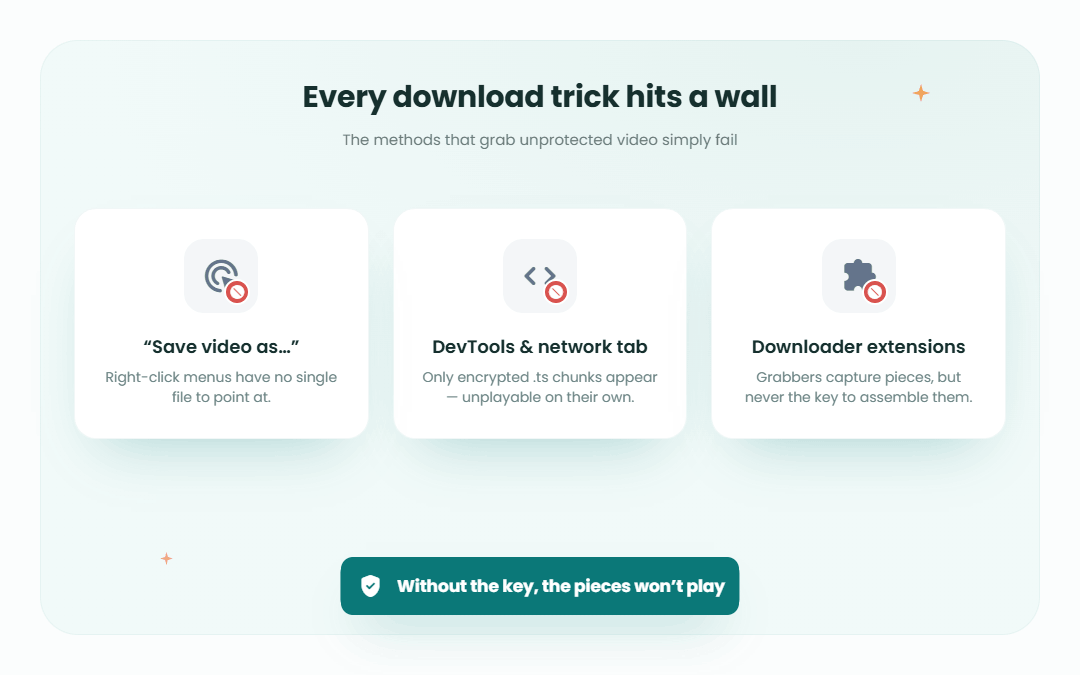
The most common mistake: hosting the key file at a public HTTPS URL referenced directly in the HLS playlist. With basic encryption like this, browser extensions or command-line tools can fetch the playlist and key in seconds. Your video encryption becomes little more than a speed bump.
Best results come when you combine HLS encryption with stronger delivery controls:
– Tokenized URLs that expire quickly, bound to a specific session, IP, or domain
– Domain and referrer locks so the HLS stream only loads from approved sites
– Key rotation to limit exposure windows
– Access logs to detect abnormal download patterns from unauthorized users
DRM goes further: the key never reaches the page. A license server issues it per session to a protected decryption module in the browser or device — hardware-backed on devices that support it
Implementing HLS Encryption: Step-by-Step
For developers or technical course creators implementing encryption, here’s a high-level workflow; teams often use it for internal libraries such as corporate training:
Encode: Use FFmpeg to transcode your source video files into a multi-bitrate H.264/AAC HLS package (for example, 1080p 5 Mbps, 720p 3 Mbps, 360p 1 Mbps).
Segment: Generate .ts segments and an M3U8 manifest. Typical segment duration for VOD is 4–6 seconds, with HLS breaking delivery into small chunks, typically 2–10 seconds each.
Generate keys: Create a 16-byte AES-128 encryption key using OpenSSL (openssl rand 16 > enc.key) and an optional IV.
Create key info file: Build an enc.keyinfo file containing the key URI, local key file path, and IV-this is what FFmpeg references during encryption.
Encrypt: Run FFmpeg with -hls_key_info_file enc.keyinfo to produce encrypted segments and a manifest with METHOD=AES-128.
Secure key delivery: Host the key file behind authenticated endpoints. Use signed URLs from your content delivery network or a backend that validates user sessions before returning the key.
Configure server/CDN: Serve everything over HTTPS. Restrict key file access with token-based rules.
Test: Verify that authorized users can watch while unauthenticated key requests return 403 errors. Try common download tools to confirm encrypted videos are unplayable, and if you use more than VOD, validate both live and on-demand video stream workflows.
If this feels like a lot of infrastructure work, that’s exactly why managed platforms exist. More on that below.
Key Delivery and Content Protection Strategies
Protecting the encryption key is the real heart of video streaming security. Poor key delivery nullifies strong cryptography. Strong key delivery plus access controls help protect content for premium libraries and sensitive training use cases.
Direct vs. proxy delivery: Direct delivery has the player fetch the key from a CDN via signed URL. Proxy delivery routes requests through an application server that checks user rights first. Decryption keys in HLS encryption are delivered separately over HTTPS, and key management can be a significant challenge in HLS encryption-especially at scale, and when compliance requirements from premium content providers demand strict content protection standards.
Hardening techniques based on industry best practices include HMAC-signed URLs with short token lifetimes, IP binding, and storing key files separate from video segments. For course creators, this means tying keys to logged-in subscribers, revoking access when payments fail, and blocking suspicious devices. DRM systems manage encryption keys and licenses centrally using expiry dates and device binding, and where DRM costs nothing extra, there’s little reason to stop at encryption.
How HLS Encryption Protects Course Creators and Membership Sites
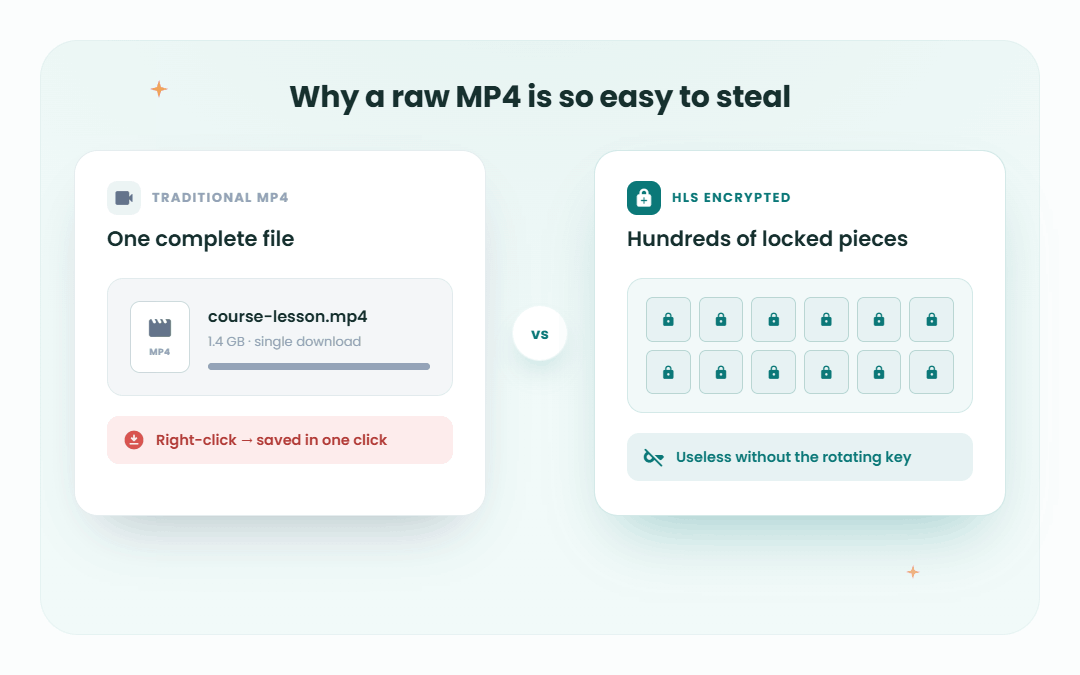
Unprotected MP4 hosting lets unauthorized users right-click and save your entire course in minutes. HLS encryption eliminates that single-file vulnerability: there is no single video file to grab-just hundreds of encrypted segments and a manifest that is useless without the key.
HLS encryption helps prevent unauthorized access to video content. Combined with domain-level restrictions, your HLS stream only plays when embedded on your LMS. Combined with viewer-level watermarking and login-based access, unauthorized sharing becomes risky and unattractive. HLS encryption reduces piracy risk for premium content-from launch cohorts and high-ticket programs to compliance training libraries where leaks harm both revenue and reputation.
Only authorized users who pass authentication can receive the key and watch HLS encrypted videos. For everyone else, the encrypted content is noise.
Spotlightr’s DRM: Real Protection on Every Plan
Spotlightr is a video hosting platform built for course creators, coaches, and businesses. Spotlightr includes DRM — Google Widevine and Apple FairPlay — on every plan, with no add-on. DRM protects playback wherever the device supports it; Force DRM blocks playback everywhere else. It helps protect premium media and corporate training libraries with layered security rather than basic encryption alone.
Key features of Spotlightr’s DRM approach:
– Hardware-level key protection: Protected key handling: each playback session gets its own license, and the key goes to the browser’s or device’s DRM module — never to the page.
– Domain restrictions: Account owners whitelist specific domains so video playback is allowed only on approved sites, preventing hotlinking.
– Frictionless player: Spotlightr’s HTML5 player supports DRM-protected playback across web browsers and mobile devices without requiring plugins.
– Accessible pricing: Even entry-level plans include full DRM, so solo creators can test core protection with a free trial before upgrading.
– Force DRM, per video: Where a device can’t run DRM the video plays unprotected by default; switch Force DRM on and it refuses to play instead.
Spotlightr also offers an optional viewer watermark that stamps the viewer’s name, email or IP on the video, so a screen recording can be traced back.
One-Time Sign-In Codes and Device Limits
Spotlightr can ask viewers to sign in with a one-time code sent to their email, so only the person with access to that inbox can unlock the video. Each code works once, which stops a login being passed around as a reusable password.
Device limits, set once for your whole account, cap how many devices one login can watch on, which stops a single account being passed around.
Together, these practical solutions—one-time sign-in codes and device limits—provide course creators and membership site owners with granular control over who watches their content and from where, significantly reducing the risk of unauthorized access and piracy without compromising the user experience.
Why Encryption Alone Is Not Enough—and What Spotlightr Does Differently
Encryption methods like HLS AES-128 provide a baseline level of protection by scrambling video segments. However, this alone is insufficient because the decryption keys are often exposed or poorly protected, allowing pirates to intercept and decrypt streams.
Spotlightr goes beyond basic encryption by offering full DRM on every plan, which includes:
– A license per playback session, so the key is never exposed to the page.
– Access controls around it: device limits, expiring access, and one-time sign-in codes.
– Token-based access control ensuring only authenticated users receive decryption keys.
– Domain and geo restrictions to prevent unauthorized playback outside approved environments.
This comprehensive approach ensures that your video content is protected with the same DRM systems the major streaming services use.
For course creators, this means peace of mind that paid content stays secure, piracy is minimized, and recurring revenue is preserved.
Best Practices for Secure HLS Video Hosting
– Always use HTTPS for manifests, segments, and key delivery.
– Use token-based authentication with short expiration times for every streaming request.
– Implement domain, referrer, and IP restrictions.
– Combine DRM with user authentication, role-based access, and rate limiting.
– Apply dynamic watermarking to deter screen recording and trace leaks.
– Regularly test your streams with common download tools and browser extensions to verify protection effectiveness.
Performance impacts from DRM decryption are minimal for most viewers, especially when multiple quality levels are encoded for adaptive bitrate streaming.
FAQ
Does HLS encryption completely prevent screen recording?
No streaming technology—including DRM—can fully stop screen recording or camera capture. DRM prevents direct file downloads and unauthorized playback. A viewer watermark (e.g., the viewer’s email overlaid on the video) makes screen-recorded copies risky to share because leaks are traceable. Treat DRM as a strong deterrent against mass piracy, not a guarantee against every single clip capture.
Can students still watch DRM-protected videos on slow connections?
Yes. DRM works with adaptive bitrate streaming: the player switches between multiple renditions based on available bandwidth while maintaining protection. The overhead from the decryption process is minimal compared to video encoding itself. Encode at several resolutions (1080p down to 360p at ~1 Mbps) so learners on slow connections can still stream securely.
Is a VPN able to bypass DRM and download my videos?
A VPN changes the viewer’s apparent IP and location but does not expose decryption keys or bypass DRM protections. DRM remains fully effective over VPN connections. VPNs may circumvent geo-restriction rules but not the underlying cryptography. If your platform uses tokens, domain locks, and session-based access, a VPN alone will not grant unauthorized access.
Can I still offer downloadable lessons if I use DRM?
DRM is designed primarily for secure streaming, not for providing standard MP4 downloads. Offering raw downloads reintroduces easy sharing risks. Alternatives include time-limited or lower-resolution download options inside a controlled app. Many course creators rely purely on DRM-protected streaming and reserve downloads for low-risk bonus materials like worksheets or slide PDFs.
How do I migrate existing MP4-hosted courses to DRM protection?
Upload your original MP4 files to a platform that supports DRM (such as Spotlightr), let it repackage videos into DRM-protected streams, then replace old embed codes in your LMS. Run a test cohort first to verify playback across devices. Keep legacy MP4 assets in archival storage but remove all public links so the only accessible versions are the new DRM-protected videos.
Protect and Secure Your Valuable Video Content
Real DRM on every plan, from $10 — Widevine and FairPlay,
Force DRM per video,device limits and one-time sign-in codes.
Try it free for 2 weeks, no credit card required.

Bill is the founder of Spotlightr, a video platform used by course creators, membership sites and marketers who need their video hosted properly rather than uploaded somewhere and hoped for. He writes about instructional video from the inside — what creators actually publish, where students actually stop watching, and what the platforms in this category actually charge. He’s currently building Spotlightr Courses, a course product built around the video rather than bolted on top of it.