

How long should a course lesson be?
– Conventional “keep every lesson under 6 minutes” advice comes from decade-old MOOC research with casual, drop-in audiences – not today’s paying students in structured online courses.
– We host 56,800 videos uploaded this year – 19,810 hours, or about two and a half years of continuous playback. The average one runs 20.9 minutes, more than 3× the common 6-minute recommendation.
– Even excluding structured course and gallery content, the average video on Spotlightr is still 20.0 minutes. Long-form instructional video is the norm, not the exception.
– The practical rule: design each lesson around one clear learning outcome per video. Whether that takes 5 minutes or 35 minutes depends on your audience, your subject, and your content – not on a fixed number from a research paper about free university MOOCs.
The “6-Minute Rule” and Where It Really Came From
“Keep it under six minutes” became gospel around 2013 when researchers at MIT and Harvard analyzed 6.9 million video sessions across edX MOOC videos. They found that student engagement remains high for videos under 6 minutes, that engagement drops sharply after 6 minutes of video length, and that the median engagement time for MOOC videos is 6 minutes. Videos shorter than 2 minutes had the highest engagement levels of all, and videos between 2-5 minutes were more likely to be fully viewed.
These are real findings. But they describe a very specific context: massive, free, 10–15 week university courses where millions of viewers could drop in and leave at any moment. The problem isn’t the research. The problem is that nearly every blog post, Ted talk, and social media thread about optimal video length repeats these numbers as universal truth – applying MOOC data to paid online courses, corporate training, membership sites, and classroom instruction where the audience and stakes are completely different. Later studies, including work on blended master’s programs, found average viewing sessions of 15.06 minutes with completion rates around 76%. The 6-minute figure isn’t wrong – it’s incomplete.
What Creators Actually Upload: Spotlightr’s 2026 Video Length Data
Here is what the data actually looks like. From January through August 2026, Spotlightr received 56,800 video uploads totaling 19,810 hours of runtime. This is upload data – what creators publish to the platform – not viewing or retention data. We are describing what people create, not what viewers watch.
The headline figure: the average uploaded video length across the entire platform is 20.9 minutes. Our customers do host all sorts of content, including webinars, video-on-demand content, marketing videos, general purpose/informational, and of course lots of course and learning content. So it’s important to know that the 20.9 min avg is across all users on all plan tiers and all video types. When you dig into the numbers a bit more, the outlook is different.
Average length ranges from 10.8 minutes to 34.4 minutes depending on which plan the customer is on – a 3.2× spread on a single platform. There is no one right length; there are different types of jobs being done. Scale-tier customers upload 41% of all videos but only 21% of hours – high-volume, short-form content. Premium-tier customers represent 24% of videos but 40% of hours -lots of long-form, instructional material.
Videos inside structured courses and galleries average 37.8 minutes – 81% longer than the platform average. That figure holds independently on two different plans (37.6 and 38.9), which makes it more trustworthy than a single blended number. However, the Course/Gallery category also includes galleries used for presentations and long-form video, so treat 37.8 minutes as an upper bound on average lesson length. Even excluding Course/Gallery content entirely, the average video runs 20.0 minutes. Longer videos are normal across the whole platform, not just inside courses.
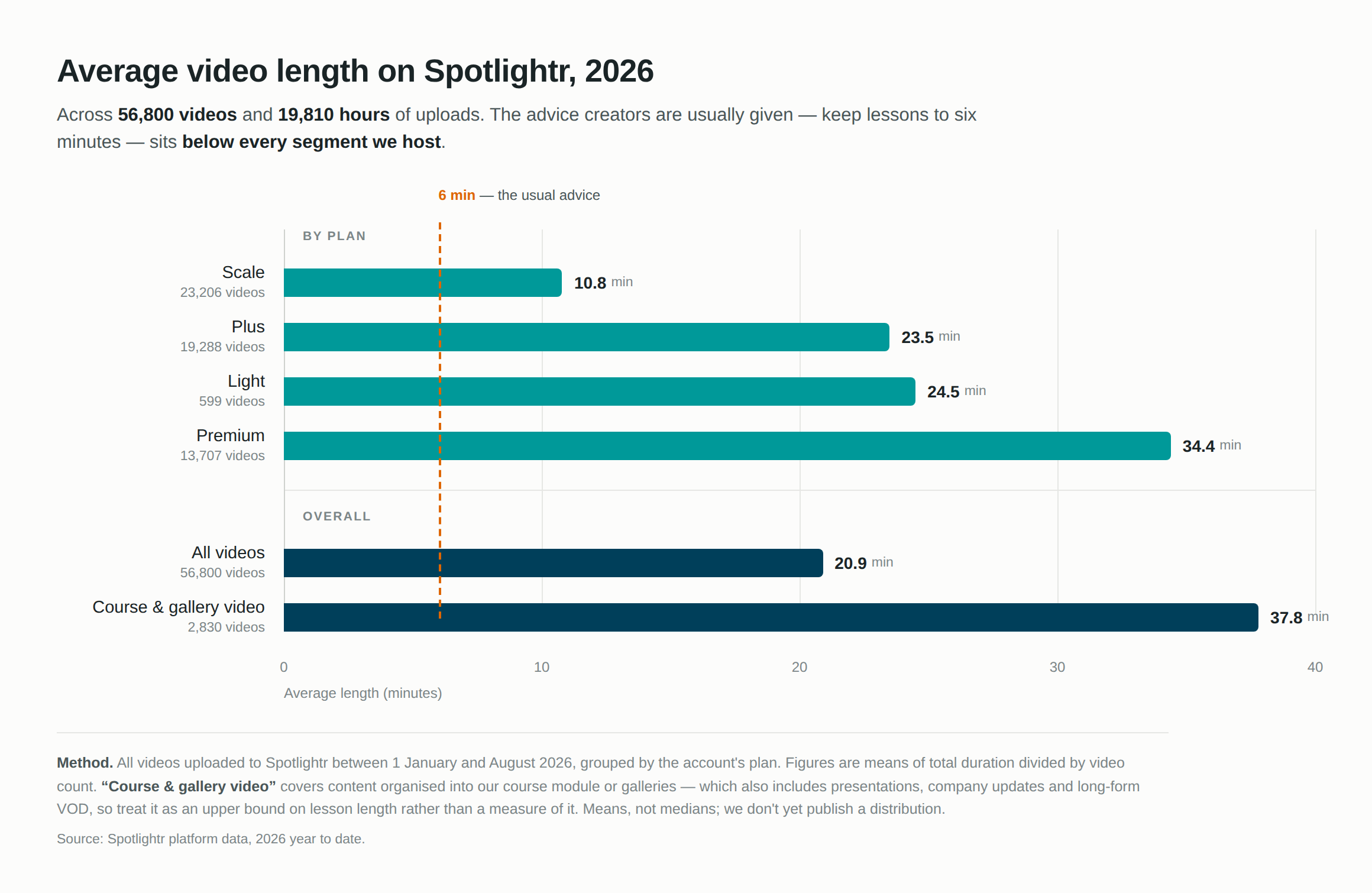
(Spotlightr platform data, 56,800 videos, 2026 YTD)
One email a month at most. Unsubscribe any time.
Why the Advice and Real-World Behavior Diverge
Widely-shared blog posts say “short videos only,” but Spotlightr creators routinely upload 15–40 minute instructional video to their online courses. The reason is simple: the audience is different.
MOOC viewers and social media scrollers are sampling. They haven’t paid, they may lose interest at any moment, and their attention span is split across tabs. Someone who has paid for a course, joined a membership, or started onboarding at work is already invested. Adult learners can tolerate video lessons of almost any length when they’re committed to the outcome.
Creator workflow matters too. Recording one solid 25-minute walkthrough is often more practical than producing five perfectly edited 5-minute fragments, especially for busy solo educators. And platform tools like chapter markers, interactive timelines, and bookmarks – which Spotlightr offers – make longer videos easy to navigate. The divergence doesn’t mean MOOCs are wrong. It means their numbers describe one specific use case, not a universal rule for every instructional video, training environment, or course.
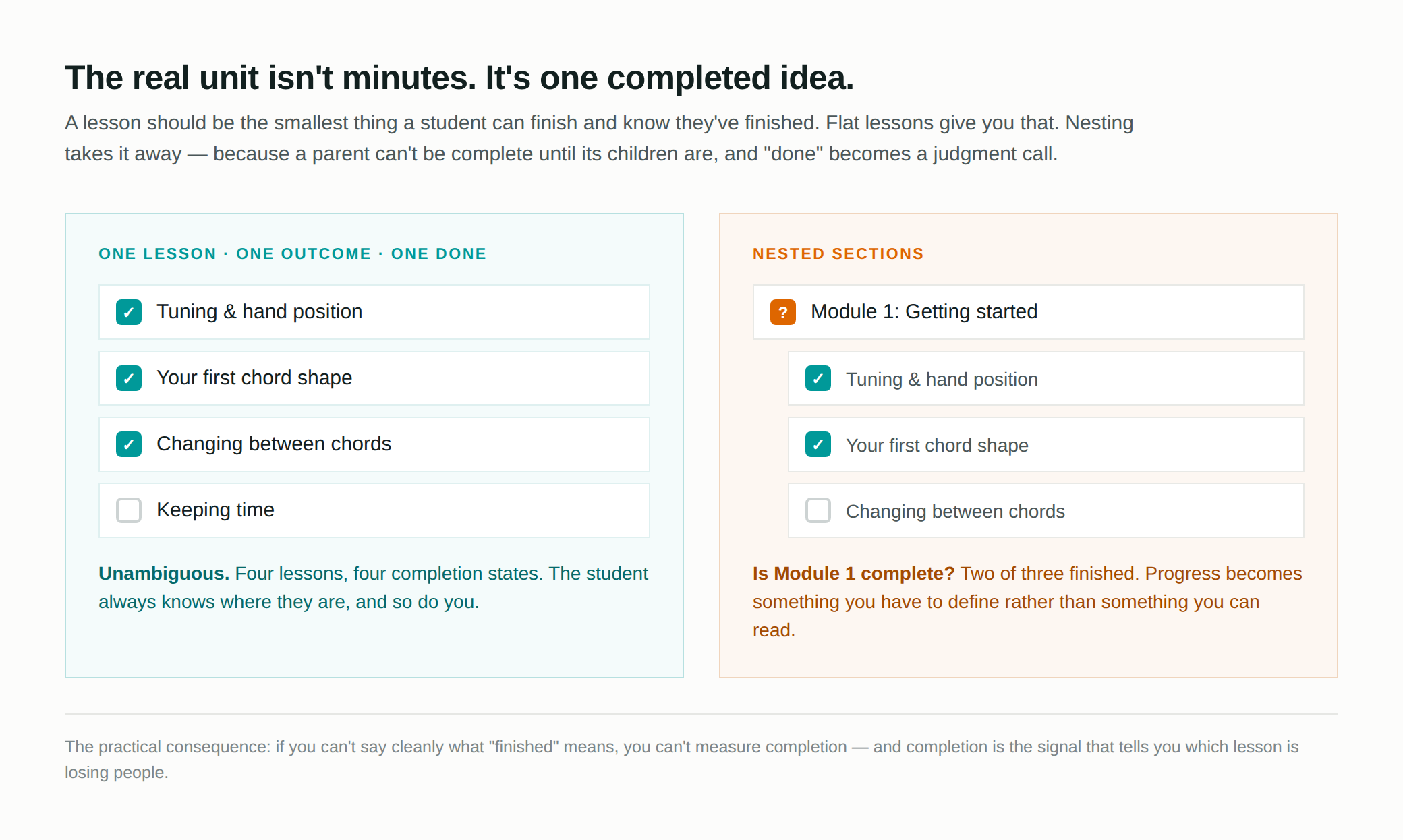
The Real Unit of Length: One Lesson, One Outcome, One Completion State
Instead of chasing a fixed optimal video length, design each video lesson around one clear learning objective – one thing the learner can do when the lesson ends. Educational videos should generally focus on one clear learning objective, and you should break down large topics into micro-lessons focused on single objectives.
A lesson like “set up a WordPress membership plugin” might naturally need 20 minutes. “Define a quadratic equation” might need 5. Let the outcome determine the length, not the other way around. Spotlightr’s engagement analytics – per-video heatmaps and completion tracking – let you validate whether your structure is working, without following an arbitrary minute count.
When to Split a Lesson – and When Not To
Splitting every lesson into 2-minute segments is not automatically better. Sometimes it creates cognitive fragmentation and extra friction in your LMS. Cognitive Load Theory suggests limiting video length to prevent cognitive overload, but chunking content into smaller videos can enhance comprehension only when each chunk is a meaningful unit.
Split when:
– You change tools or contexts mid-lesson
– You shift from concept explanation to hands-on walkthrough
– You ask the learner to pause and do something – it is better to divide longer lessons into smaller segments with activities
– You discover via Spotlightr video analytics that there is a signifcant drop-off point across multiple students
Don’t split when:
– A process only makes sense end-to-end (live coding exercises, complete editing workflows)
– Fragmentation would force learners to click through many tiny clips to complete one logical task
– Natural breaks in longer videos can maintain engagement without separate files
Interactive elements should be included to promote active learning regardless of length. Many course creators using microlearning combine shorter micro-lessons for definitions with longer capstone videos for applied projects – a hybrid approach that serves different types of knowledge in the same course.
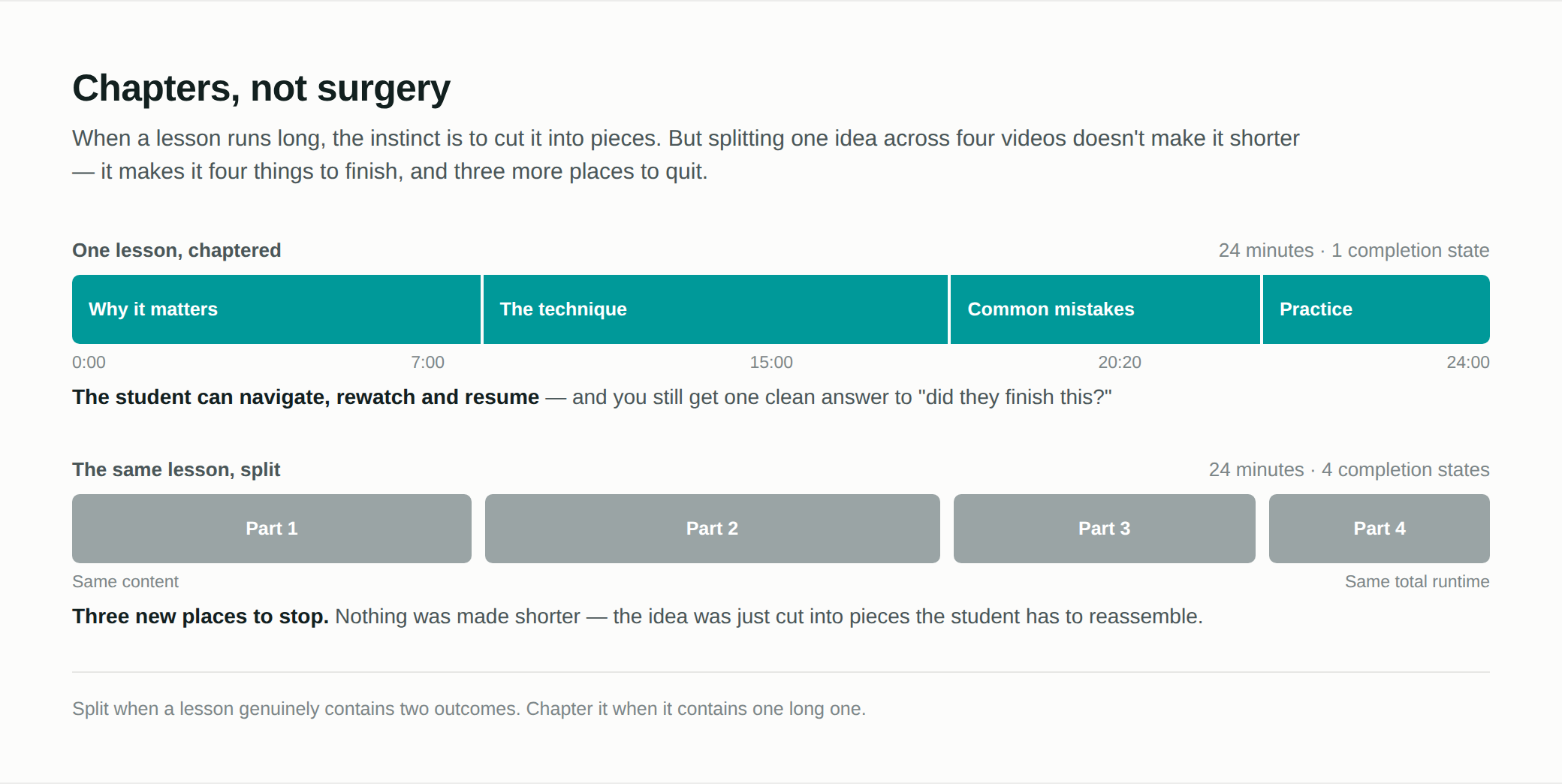
Designing Longer Lessons Well: Chapters, Not Surgery
Many high-value instructional videos naturally run 25–45 minutes – especially in professional development, software training, and premium online courses. Rather than surgically cutting these into multiple files, use chapters.
Chaptering means adding timestamps, on-screen titles, and visual transitions that create clear internal sections viewers can jump between. Spotlightr’s chapter markers, segmented timelines, and table-of-contents overlays let learners treat one long video like a mini-playlist without extra editing workload for you.
Place waypoints at natural conceptual boundaries: introduction, main steps, common mistakes, recap, and call-to-action. Start with a concise 30–60 second overview so learners can decide whether to watch or jump ahead. This preserves the integrity of complicated demonstrations while still respecting your audience’s time. Focus on delivering value at each chapter point, and learners won’t lose interest even in an engaging 40-minute lesson.
How Spotlightr Supports Every “Ideal Length” You Choose
Spotlightr is built to support both short and long video for online courses, memberships, and training libraries – without forcing you into a one-size-fits-all video length strategy.
– Security: HLS encryption, watermarks, and domain restrictions make it safe to host high-value long-form content like 30–60 minute premium lessons
– Customizable players: Branded watch pages present both quick clips and deep-dive lectures professionally within any LMS, including WordPress/LearnDash
– Analytics: Engagement heatmaps and per-chapter drop-off data let you iterate on your own ideal length based on your specific audience – explore what actually works instead of guessing
– Monetization: Email gates, in-video CTAs, and pay-per-access models work for micro-lessons and full-length courses alike
You can start a 14-day risk-free trial, upload your content at whatever length your teaching requires, and let real data from your learners tell you what the right answer is.
FAQ
Is there a single “optimal video length” I should always aim for in my online courses?
No universal optimal video length exists. Effectiveness depends on your learners, subject matter, and the specific learning outcome of each lesson. Spotlightr’s 2026 data shows an average upload length of 20.9 minutes across all videos, with structured course and gallery content averaging 37.8 minutes. Use “one clear outcome per video” as your design rule and let the length follow from that – not from a fixed figure you found in a blog post.
Should I break every long instructional video into multiple short videos?
Only when a single file covers multiple distinct outcomes or when learners will frequently revisit just one section. Over-splitting can make navigation harder if students must click through many tiny clips to achieve one goal. A hybrid approach works well: keep clear conceptual boundaries via chapters or separate videos, but avoid slicing continuous demonstrations into artificial fragments.
How short is too short for an instructional video?
Videos shorter than 2 minutes have the highest engagement rates, but they rarely deliver enough material for a complex skill. There’s no hard floor — the real question is whether the job is small enough to fit. Under about three minutes you’re realistically doing quick examples, clarifications, summaries, or introducing a concept, not teaching it. If that’s the job, that’s the right length.
What if my learners are watching on mobile or have limited time?
Busy and mobile learners benefit most from clear structure, but understand that most learning happens from mobile devices so the above assertions are not dependent on mobile VS desktop. Spotlightr’s player supports mobile-friendly controls and chapter navigation for both short and long content.
How can I decide on video length if I’m just starting my first course?
Don’t start with a length. Start with one outcome per lesson, record it without watching the clock, and see where it lands. If that’s 8 minutes, fine. If it’s 30, you’re still in normal territory — the average video on Spotlightr runs 20.9 minutes, and video organised into courses runs longer still. Then publish, and after a few weeks use Spotlightr’s engagement analytics to see where learners stop, rewatch or skip. Your own students will give you a better answer in a month than any rule will.
One email a month at most. Unsubscribe any time.

Bill is the founder of Spotlightr, a video platform used by course creators, membership sites and marketers who need their video hosted properly rather than uploaded somewhere and hoped for. He writes about instructional video from the inside — what creators actually publish, where students actually stop watching, and what the platforms in this category actually charge. He’s currently building Spotlightr Courses, a course product built around the video rather than bolted on top of it.