

Updated August 2026
LearnDash LMS charges between $199 and $599 per year for its self-hosted WordPress plugin, depending on the tier. However, the license fee alone does not represent what course creators actually spend. Hosting costs can add approximately $300 annually, and paid add-ons can push the real total well past the sticker price. This breakdown covers every line item so you can budget accurately.
LearnDash LMS Plugin: Liquidweb Buyout
Since LearnDash was purchased by LiquidWeb a lot has changed, including the retirement of their LearnDash cloud product. The LearnDash plugin is still maintained and supported by the Liquidweb company and this article will review it’s current offering.
What Is LearnDash?
LearnDash is a WordPress LMS plugin that lets you create courses, quizzes, assignments, and completion certificates inside any WordPress site. It is used by major universities and independent course creators alike. The platform includes a drag-and-drop course builder for easy content creation, and LearnDash does not charge transaction fees on course sales. LearnDash is a self-hosted WordPress plugin you install on your own website, giving you complete control over your server environment, themes, and deeper customization.LearnDash Pricing at a Glance:
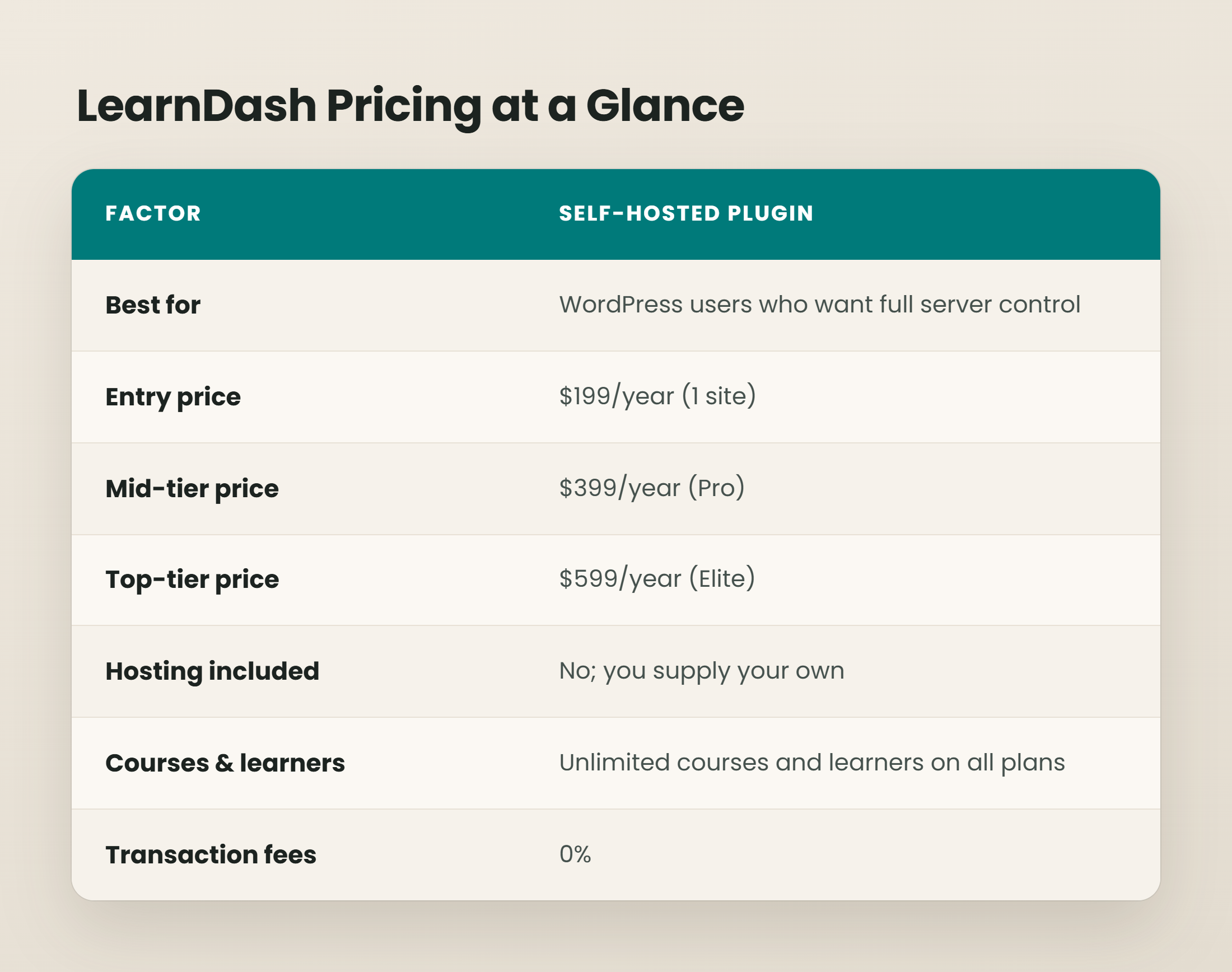
LearnDash Plugin Plans and Features
LearnDash structures its pricing plans into three tiers. Here is what each level includes and where the differences justify the price jump.
Essentials ($199/year plugin)
The Essentials tier covers the basic features most solo course creators need: the drag and drop course builder, unlimited courses, quizzes with advanced quizzing options, drip content scheduling, assignments, focus mode for distraction free learning, progress tracking, and completion certificates.
Pro ($399/year plugin)
Pro unlocks the quiz builder advanced reporting suite, group management and cohort features, weighted grading, and an AI-powered course builder. These features matter once you are managing online courses for dozens or hundreds of learners.
Elite ($599/year plugin)
Elite adds front-end course creation (so an instructor role can build courses without WordPress backend access), ratings and reviews, and multi-instructor tools. It allows multiple instructors to collaborate on course creation without granting admin-level permissions.
LearnDash offers unlimited courses and learners on all plans. The tiers differ by feature set, not capacity.
Winner: Essentials for most users
A solo creator selling a handful of online courses does not need group management or multi-instructor workflows. Essentials provides enough to build courses, manage courses, sell courses, and track course completion. Upgrade to Pro only when you need cohort-level reporting or serve learning programs with group enrollment. Move to Elite when you bring on additional instructors or need front-end authoring.
Hosting and Themes Cost
When considering the total cost of using LearnDash, it’s essential to factor in the costs of hosting and themes. While LearnDash provides the core LMS functionalities, you will need a suitable theme to enhance the visual appeal and usability of your site. Other costs like LearnDash video hosting costs, web hosting, email marketing, etc should also be considered as part of your budget. The BuddyBoss theme, for instance, starts at $99/year and is a popular choice for LearnDash users. Alternatively, the Astra theme starts at $99/year or $279 one-time.
Stylish eLearning themes with ready-to-import demos can also be acquired, starting at $100. Moreover, hosting solutions are an important consideration, as they are separate from LearnDash’s standard pricing. Research and select a hosting option that meets the specific needs of an LMS environment to ensure smooth performance and scalability.

LearnDash Features and Benefits
LearnDash is packed with features that make it a powerful LMS platform. These features include extensive customization options, over 15 design options for the LearnDash course grid add-on, and various functionalities that enhance the learning experience. Check out our LearnDash review article for details on some of its features.
Hidden Costs and Add-Ons
The learndash cost printed on the pricing page is the starting point, not the finish line. Here is where the real total comes from.
Hosting (plugin users only). A reputable WordPress host for a site delivering course content with video and concurrent learners costs $10 to $50 per month for small to mid-scale operations. Hosting costs can add approximately $300 annually at the low end. Video-heavy sites with hundreds of concurrent students will need managed hosting, CDN, and caching layers that push costs higher.
Themes and page builders. Astra Pro theme costs around $59 per year for LearnDash. Other premium themes or drag and drop builder licenses (Elementor Pro, Divi) typically run $50 to $200 per year.
Add-ons. LearnDash relies on paid add-ons for several features that are not included in lower tiers. Gradebook, Notes, Ratings & Reviews, and Group Management add-ons each carry annual fees; for example, Gradebook runs about $49/year for a single site. Add-ons can increase the total cost of LearnDash by $100 to $300 or more per year depending on how many you need.
Payment processing. While LearnDash charges zero transaction fees, Stripe and PayPal still take their standard cut (around 2.9% + $0.30 per transaction in the U.S.). If you process payments through WooCommerce, factor in WooCommerce extension costs as well.
Video hosting. LearnDash does not include video hosting. If your course offerings rely on video lessons, you need a separate video hosting solution. Secure video hosting platforms often use encryption for content protection, and integrating video hosting with LMS tools can enhance course delivery with features like video analytics that track engagement and performance metrics. Services like Spotlightr cater to educators and marketers with customizable video players that enhance branding, lead capture tools including email gating and CTAs, and video monetization options like pay-per-access and gated content. Subscription-based models are common in video hosting services, adding another recurring line item to your tech stack.
Maintenance time. Self-hosted plugin users must update WordPress core, the LearnDash plugin, themes, and all add-ons on a regular cycle. Plugin conflicts after updates are common enough that many operators either learn to troubleshoot or hire someone at $50 to $150 per month on retainer.
Winner: Clear cost structure for plugin users
Without a hosted cloud option, plugin users must budget for hosting, add-ons, and maintenance. This offers flexibility and control but requires a more hands-on approach to managing costs.

Transaction Fees and Payment Processing
LearnDash does not charge transaction fees on course sales across any plan. Every dollar a learner pays (minus payment gateway fees) goes to the creator.
Compare that with competing LMS platforms. Teachable’s Basic plan charges a 5% transaction fee on top of payment processing fees. Thinkific matches LearnDash with no transaction fees but at a higher base price. FreshLearn and Podia offer competitive pricing but with different feature sets.
Winner: LearnDash across the board
Zero transaction fees is one of LearnDash’s clearest advantages over hosted course platform competitors. For anyone expecting to sell online courses at volume, this difference compounds over time and directly affects profitability.
LearnDash Pricing: Which Should You Choose?
Choose Essentials if you already run a WordPress site, have experience with WordPress based LMS plugins, and want to build courses with maximum flexibility. Budget $450 to $650 for year one (license + hosting + theme + a couple of add-ons).
Choose Pro if you manage learning programs with cohorts, need advanced reporting on quiz performance and course completion rates, or want the AI course builder. The $399/year license pays for itself once you are managing more than a handful of learners across multiple courses.
Choose Elite if your business involves multiple instructors, front-end course authoring, or a marketplace model where instructor role permissions and ratings matter. At $599/year, it is less expensive than hiring a developer to build those workflows from scratch.
LearnDash provides gamification features like badges and points for engagement across all tiers, which can help improve completion rates without purchasing separate gamification plugins. The platform’s drag and drop builder, focus mode for distraction free learning, and built-in progress tracking make it a capable learning platform for most course creators.
For the majority of solo creators just starting to sell online courses, Plugin Essentials paired with affordable hosting is the most cost-effective entry point. Upgrade to higher tiers as your learner count and operational complexity grow.
One consideration that applies across all plans: because LearnDash does not include built-in video hosting, encryption, or watermarking, pairing it with a dedicated video platform improves content protection and analytics. The EdTech industry increasingly incorporates video marketing strategies, and having the right video hosting in your tech stack makes a measurable difference in course delivery quality.
Frequently Asked Questions
Does LearnDash offer a free plan or trial?
What's the real monthly cost including hosting?
Can I switch between plugin and cloud versions?
Since the LearnDash Cloud product has been retired, switching to or from Cloud is no longer applicable. Users should focus on the self-hosted plugin version.
Are there cheaper LearnDash alternatives?
Several learndash alternatives exist at lower price points. LifterLMS has a free core plugin for WordPress, though its paid bundles for advanced features start at $120/year. TutorLMS also offers a free WordPress plugin with paid upgrades. For non-WordPress options, Teachable and Thinkific are hosted platforms that handle everything but charge higher monthly fees and, in Teachable’s case, transaction fees on lower tiers. LearnDash’s combination of zero transaction fees, unlimited courses, and WordPress flexibility makes it competitive on total cost for creators with existing WordPress experience.
Spotlightr Video Hosting For Your Course
Discover why Spotlightr is the #1 choice for course creators and e-learning professionals.
Register for a free 2 week trial, no credit card required.

Bill is the founder of Spotlightr, a video platform used by course creators, membership sites and marketers who need their video hosted properly rather than uploaded somewhere and hoped for. He writes about instructional video from the inside — what creators actually publish, where students actually stop watching, and what the platforms in this category actually charge. He’s currently building Spotlightr Courses, a course product built around the video rather than bolted on top of it.