

Choosing the right video hosting for your LearnDash courses directly affects whether students can download your premium content, whether lesson completion tracks accurately, and whether your site loads fast enough to keep learners engaged. With 85% of students saying video improves their learning, the platform delivering that video matters as much as the content itself.
This LearnDash video hosting comparison covers seven options head to head: Spotlightr, Vimeo, Wistia, YouTube, Presto Player with Bunny.net, self-hosted WordPress, and Amazon S3 + CloudFront. Each is evaluated on security, cost, LearnDash integration, and the features that actually matter for paid courses.
The short answer: Most creators running paid LearnDash courses should choose Spotlightr. It is the only platform that combines HLS encryption on every plan, a native WordPress plugin with LearnDash integration, and per-student identity tracking that ties watch data to individual learners. If budget is the primary concern and you have technical skills, Bunny.net paired with Presto Player offers a low cost alternative with native video progression support since LearnDash 4.8. YouTube, self hosting, and raw AWS setups each carry trade offs that make them poor fits for most course creators selling paid content.
What’s Wrong With Just Using WordPress?
If you already know this, feel free to skip ahead.
In a nutshell: WordPress can’t serve video reliably, so a LearnDash course needs video hosted somewhere else and embedded back in. Which host you choose determines whether your video is protected, whether video progression works properly, and whether you can see which students actually watched.
Video hosting for LearnDash means using a dedicated video platform to store and stream course videos for your WordPress site while balancing two things that matter most: smooth playback for students and content security for your premium content. If you run LearnDash courses, this is the setup that lets students watch lessons on your site while the actual video delivery happens through a specialized hosting service rather than your regular web host.
Video hosting also solves the practical problem of file size and delivery cost. Course creators and online educators using LearnDash often need to upload videos that are far too heavy for self-hosting, with lesson files commonly ranging from roughly 500MB to several GB each. That makes bandwidth, reliability, and scalability a real concern, especially when multiple students are watching the same course content at once.
Standard web hosting and the WordPress media library are poor places to upload videos directly for LearnDash. Uploading videos directly to your site may seem simple, but standard web hosting is not built for streaming large videos, and performance and scalability usually suffer as your library grows or more students start watching at the same time. Dedicated video hosting services are built for this job, which is why they tend to be the better fit for LearnDash video hosting.
Videos stored in the WordPress Media Library are also easier to steal than videos delivered through dedicated hosting.
Beyond storage and streaming, the right LearnDash video hosting gives you features your website host usually does not: stronger protection for course content, better customization, analytics, and a more professional viewing experience for students. Below, we’ll cover the basics of LearnDash video hosting, what LearnDash course owners should look for, how the main hosting platforms compare, the pros and cons of each, and why Spotlightr stands out as a strong choice.
LearnDash Video Hosting: Quick Comparison Overview
| What it costsBilled monthly | Video progression | Download protection | Whose branding | Tracks each student | Best for | |
|---|---|---|---|---|---|---|
| YouTube (unlisted) | Free | Works | None | YouTube's, plus end screens | No | Free courses |
| Self-hosted in WordPress | Free until your host complains | Unreliable at scale | None | Yours | No | Small internal use only |
| Presto Player + Bunny | Usage based, ~$4.50/mo at 300 GB stored / 50 GB delivered | Needs the HLS playlist URL, 720p minimum | Token auth and DRM included | Yours | No | Technical, cost-sensitive builders |
| Spotlightr | $15/mo Light, $25/mo Plus, $65/mo Premium |
Works, no caveats | HLS encryption on every plan. DRM and watermarking from Plus | Yours, every plan | Yes | Paid courses where the video is the product |
| Vimeo | $20/mo Starter, $41/mo Standard, $125/mo Advanced | Only if your videos are public | Password and unlisted links. DRM is Enterprise only | Vimeo's on Starter, removable from Standard | No | Teams already using Vimeo |
| Wistia | Free tier, then $99/mo. Storage and bandwidth | Works, but LearnDash's video controls don't display | No DRM | Wistia's on Free, removable at $99 | No | Marketing teams already using Wistia |
| Amazon S3 + CloudFront | Per GB stored and delivered | Works | Only if you build signed URLs | No player at all | No | Infrastructure, not a product |
| Pricing verified August 2026. Video progression support per LearnDash documentation. | ||||||
Spotlightr: Native LearnDash Integration with Full Student Tracking
Spotlightr is built specifically for course creators and video marketers who need to host videos with strong protection and deep LMS integration. It offers an official WordPress plugin that connects directly with LearnDash, enabling automatic video progression and per-student analytics without any custom code.
The starter plan begins at $15/month (or $150/year) and includes 25 videos, 200 GB bandwidth per month, and 50 GB storage. Every plan includes HLS encryption and domain embed protection – there is no security paywall. Spotlightr includes AES-128 HLS encryption by default. Overages run approximately $0.05/GB for bandwidth.
What sets Spotlightr apart for LearnDash courses is student identity pass-through. When a logged-in student watches a video on your LearnDash site, Spotlightr’s plugin transmits that student’s identity to the analytics dashboard. This means you see individual watch behavior – not just “this video was played 40 times.” More on this in the dedicated section below.
Additional features include customizable players with overlay templates, in-player quizzes, email capture gates, CTAs, transcription with subtitle translation, and Stripe integration for pay-for-access content. Spotlightr offers in-player quizzes and heatmaps for engagement tracking. A 14-day free trial is available with no credit card required.
Wistia: Marketing-Focused
Wistia targets businesses that want to use video as a marketing tool, and its analytics reflect that focus. Wistia provides heatmaps showing second-by-second engagement, revealing exactly where viewers rewatch, skip, or drop off. This level of advanced analytics is genuinely best-in-class for understanding viewer behavior.
The Wistia pricing plans can be prohibitive for many users. The free plan includes 25 GB of storage with limited features. The Pro plan costs $99/month and includes 250 GB of storage. Bandwidth runs approximately 1 TB/month on the Pro plan. Customizable players enhance branding and engagement for video content, and Wistia excels here with full player customization, built-in email capture gates, and CTA overlays.
For security, Wistia offers domain restriction and the ability to disable direct downloads. There is no encryption or DRM so there is no download protection.
LearnDash integration requires manually embedding Wistia’s embed code into lesson pages. There is no native plugin or official integration that passes playback events to LearnDash’s video progression feature. Course creators using Wistia typically need custom JavaScript to bridge the analytics gap – or accept that progression tracking won’t be automatic.
Vimeo: Professional Player with Bandwidth Limitations
Vimeo delivers an ad free player with a polished, professional appearance that suits branded course content. Domain restriction is available from the Standard plan upward, and Vimeo supports 4K/HDR playback with customizable player branding.
Plans start at roughly $20/month per seat (Starter), $41/month (Standard), and $125/month (Advanced). However, Vimeo has a 2 TB monthly bandwidth cap on its self-serve plans. For a growing online course with hundreds of students streaming video content regularly, hitting that limit is a real possibility – especially with high-definition videos.
Privacy controls include unlisted and private video links plus password protection. But there is no automatic LearnDash video progression support. Vimeo embeds do not natively communicate playback events to LearnDash, meaning students must manually mark lessons complete or you need custom development to bridge the gap. DRM is available exclusively on the Enterprise plan (custom pricing), making robust content protection expensive.
Vimeo is the best video hosting choice if professional appearance is your top priority and your audience is small enough that the 2 TB bandwidth cap won’t be an issue. But for LearnDash integration, it requires workarounds that most creators would rather avoid.
YouTube: Free but Fundamentally Unsuitable for Courses
YouTube costs nothing, supports unlimited videos, and works on every device. For promotional content, free previews, and marketing, it remains unbeatable. The best video hosting options for online courses include platforms like Vimeo and Bunny.net – YouTube is not among them when paid content is involved.
The problems are fundamental, not cosmetic. YouTube embeds display pre roll ads (unless you have specific agreements), show related videos from competitors at the end of playback, and offer no meaningful content protection. Unlisted videos appear to be private, but anyone with the link can view, share, and embed them. Specialized download tools and browser extensions make saving any YouTube video trivial. There is no domain restriction, no watermarking, and no encryption.
83% of students value on-demand playback, and YouTube delivers that – but alongside distractions that pull learners away from your course. There is no automatic video progression in LearnDash for YouTube embeds, and the lack of progress tracking means you have no visibility into actual engagement.
Use YouTube for your course trailer, your blog content, and your social media strategy. Do not use it to host your entire course if students are paying for premium content.
Presto Player is a WordPress plugin that provides a feature-rich video player (including picture in picture mode, speed controls, and the block editor integration), but it does not provide hosting itself. You need a separate video host, and Bunny.net is popular for LearnDash video hosting since 2021 due to its extremely low cost pay-as-you-go pricing: approximately $0.01/GB per month for storage and $0.005/GB for delivery.
The significant development here is that LearnDash 4.8 introduced native Bunny.net integration, meaning videos hosted on Bunny.net can trigger automatic video progression without a third-party plugin. This makes the Presto Player + Bunny.net combination a viable budget option with working progression tracking.
The trade off is complexity. Setting up Bunny.net requires configuring storage zones, streaming zones (for HLS), signed URLs for access control, and CORS/referrer restrictions. There are no built-in marketing features like email gates or in-player quizzes, and analytics are limited to basic play counts unless you add third-party scripts. Bunny.net is popular for its low-cost video hosting, but you pay in setup time and ongoing maintenance rather than subscription fees.
This setup is best for developers and budget-conscious course creators who are comfortable managing technical infrastructure and do not need advanced analytics or marketing tools built into their player.
Amazon S3 + CloudFront: Enterprise DIY for AWS Experts
Amazon S3 provides storage at approximately $0.02/GB per month, and CloudFront delivers content globally at roughly $0.08/GB for data transfer. For enterprise operations with large audiences and technical teams, this combination offers nearly unlimited scalability and granular control.
Security depends entirely on proper configuration. You can implement signed URLs for time-limited access, referrer restrictions, and even DRM by integrating AWS Elemental MediaConvert – but each of these requires AWS expertise and ongoing maintenance. If misconfigured, your video files are exposed. You also need a separate player solution (often Presto Player or Video.js) since AWS provides no embedded player.
There is no LearnDash integration. Video progression, analytics, and marketing features must all be built custom. The pricing model is transparent but variable – costs scale with usage, and transcoding adds additional fees.
This approach makes sense for organizations with dedicated DevOps resources processing thousands of concurrent streams. For most creators building a LearnDash site with dozens or even hundreds of lessons, the technical overhead far outweighs the cost savings compared to a managed video hosting platform.
Self-Hosted WordPress
As mentioned in great detail at the beginning of this article, this is definitely not recommended and should only be used if you have no other choice. It seems logical – your site is right there – but self-hosting videos on WordPress can lead to slow load times, and the problems compound quickly.
Large video files (even a 10-minute HD lesson can be several GB) strain your server’s CPU, memory, and bandwidth. Standard web hosting plans are not designed to serve video at scale. If you must self-host, limit it to a single free preview lesson at most. For your paid courses, use a platform built for video delivery.
Video Protection: What Each Platform Actually Offers
If you sell an online course, your video content is the product. Letting anyone download or redistribute it undermines the entire business. Yet most course creators don’t fully understand the layers of content protection available – or how differently each video hosting platform handles them.
HLS Encryption
Video encryption protects content from unauthorized access. AES-128 HLS encryption is a common standard for video security – it splits your video into small encrypted segments delivered during playback, so browser extensions and direct link grabbers cannot reassemble the file into a downloadable MP4. Spotlightr includes HLS encryption on every plan, for every video, with no additional configuration. Vimeo uses adaptive streaming but does not expose HLS encryption as a protection feature on self-serve plans. Wistia uses adaptive streaming too, though whether every video gets full HLS encryption on all plans is unclear from their documentation. YouTube offers no encryption. Bunny.net can deliver HLS-encrypted streams if you configure streaming zones correctly, but it requires manual setup. Self-hosted WordPress offers no encryption whatsoever.
DRM vs. HLS Encryption
DRM encryption prevents video downloads and unauthorized sharing at a deeper level than HLS encryption alone. DRM (Digital Rights Management) uses licensed encryption schemes like Widevine, FairPlay, and PlayReady, enforced through compliant playback clients. It can also block screen capture in some environments. Vimeo offers DRM only on its Enterprise plan. Wistia does not advertise DRM. VdoCipher offers DRM encryption to protect video content and is worth considering if full DRM is your primary requirement. For most creators, HLS encryption combined with domain restrictions and watermarking provides sufficient protection without Enterprise-tier pricing.
Domain Restrictions
Domain restriction (or embed allow-listing) ensures your embedded player only functions on approved domains. If someone copies your embed code to another site, the video refuses to load. Spotlightr, Vimeo (Standard and above), and Wistia all support domain restriction. YouTube does not. Bunny.net and S3 + CloudFront can enforce domain-level restrictions through signed URLs and referrer policies, but require manual configuration.
Watermarking
Dynamic watermarking deters screen recording by displaying user information – such as the student’s name, email, IP address, or a timestamp – as a visible overlay during playback. This does not prevent copying, but makes tracing the source straightforward. Spotlightr offers dynamic watermark capabilities. Vimeo provides custom watermarks on higher plans. Wistia supports watermarks on certain tiers. YouTube, self-hosted WordPress, and basic Bunny.net setups offer no watermarking.
Download Protection vs. “Hidden” URLs
Some platforms claim to protect video files by making URLs “hidden” or “unlisted.” This is not real protection. A hidden URL is still discoverable through browser developer tools or network inspectors. Anyone who finds the URL can download the file directly. True download protection requires encryption, signed URLs, or tokenized access so that fetching the raw file is impossible or time-limited. Spotlightr achieves this through encrypted HLS and polymorphic access tokens. Vimeo and Wistia allow disabling direct downloads, but hidden URLs can still be located by determined users. YouTube videos are routinely downloaded by third-party tools.
LearnDash Video Progression: What People Get Wrong
LearnDash’s video progression feature allows a lesson to be automatically marked complete once a student watches a required percentage of the video. Video Progression in LMS platforms controls student access to lessons based on video viewing – it is one of the most powerful tools for ensuring students actually engage with course content rather than clicking through. Over 85% of students say video improves their learning experience, but that only matters if they actually watch it.
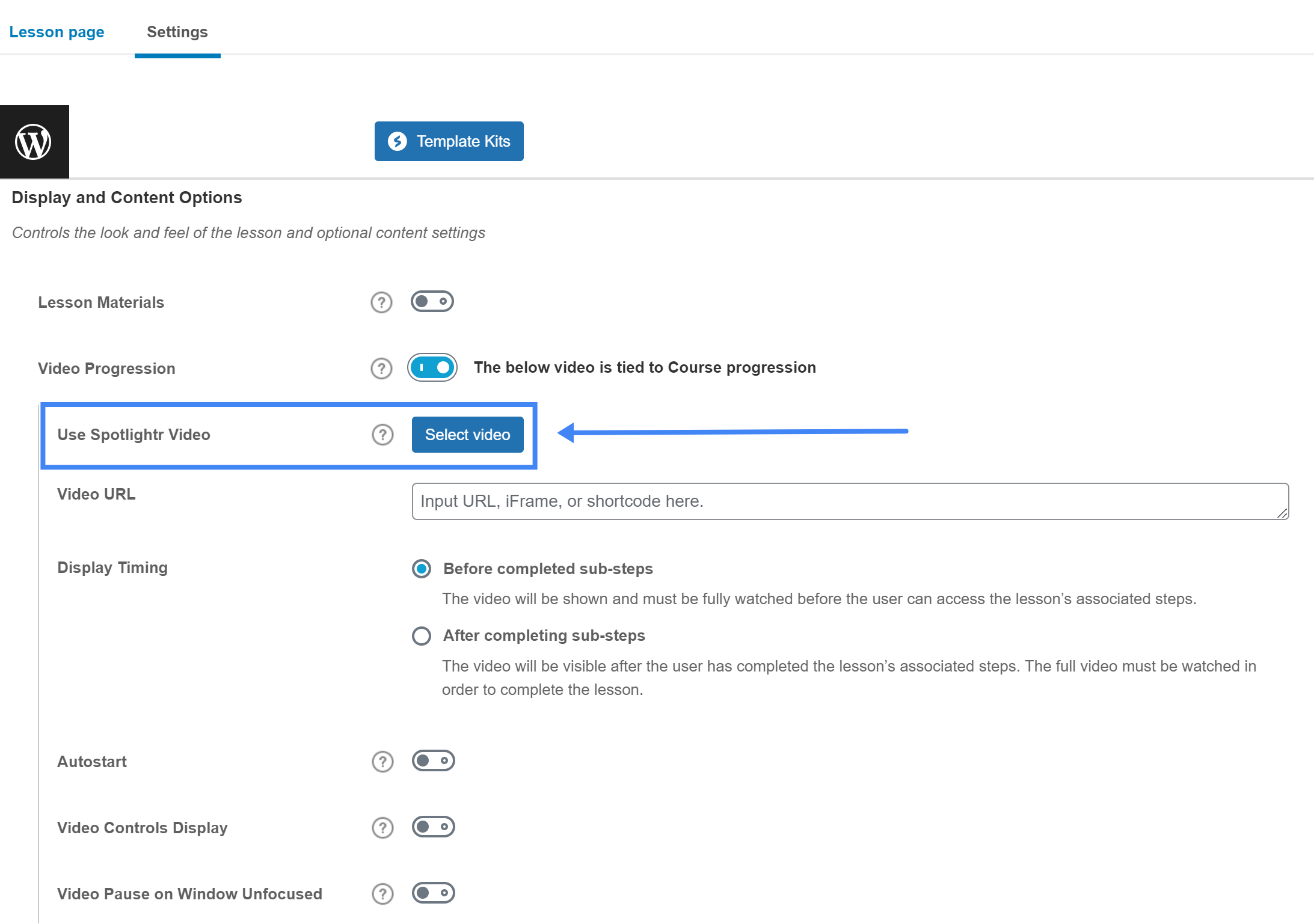
We do have a comprehensive piece on LearnDash video progression if you want to review how it works in general and how it works with Spotlightr. It’s literally as easy as installing and choosing your video in the LearnDash video progression settings as you can see from this screenshot (there’s more features of course, but this is super easy to use):
Here I’d like to get into what most creators get wrong:
Assuming progression works with any host. It does not. LearnDash supports automatic video progression only with hosts that can communicate playback events back to the LMS. Currently, this means Bunny.net (natively since LearnDash 4.8) and Spotlightr (via its native plugin). With Vimeo, Wistia, or YouTube, LearnDash cannot reliably detect that a video has been watched, so students must manually click “Mark Complete.”
Using the wrong embed method. Dropping an iframe or raw embed code into a LearnDash lesson page may display the video, but if it does not include the correct API hooks or shortcode block format, progression tracking breaks silently. Always use the host-provided shortcode or the embed method documented for LearnDash compatibility.
Confusing “marked complete” with “actually watched.” Without proper video progression, students can mark a lesson complete without watching a single second. This inflates completion rates while reducing actual learning outcomes. Spotlightr integrates seamlessly with LearnDash for video progression, ensuring that “complete” means the student genuinely watched the content.
Misconfiguring domain restrictions. If your video host requires domain allow-listing and your referrer policy strips the necessary header information, the host may refuse to serve the video – or serve it without communicating events back to LearnDash. This is a common issue with Wistia and custom setups.
Ignoring the difference between watch time and lesson completion. A student might watch 80% of a video and close the tab. Without per-student tracking, you have no way to identify who dropped off or where. This is where student identity tracking becomes critical.
Why Spotlightr’s Student Identity Tracking Changes Everything
Most video hosting platforms tell you aggregate numbers: “This video was played 247 times.” That data is almost useless for a course creator trying to understand student engagement. You don’t need to know that your lesson page got 247 plays. You need to know that Sarah watched 40% and dropped off at the billing explanation, that James rewatched the module intro three times, and that 12 students marked the lesson complete without watching past the two-minute mark.
Spotlightr is the only video host that can deliver this level of insight for LearnDash courses, because it owns both the player and the WordPress integration. When a student logs into your WordPress site and opens a LearnDash lesson, the Spotlightr plugin passes that student’s authenticated identity – their user ID or email – through to Spotlightr’s analytics engine. Every play, pause, rewind, and drop-off is attributed to a specific person.
This means you can see:
– Per-student drop-off points – exactly where each learner stops watching, so you can identify confusing sections
– Rewatch behavior – which segments students replay, indicating either high value or insufficient clarity
– Genuine completion vs. manual marking – who actually finished the video versus who clicked “Mark Complete” to skip ahead
– Individual engagement over time – whether a student’s watch time is declining across lessons, signaling disengagement before they churn
Analytics help refine lessons based on viewer engagement data, and Spotlightr’s per-student attribution makes that refinement precise rather than guesswork.
No other video host can offer this to LearnDash. Vimeo and Wistia have APIs, but matching anonymous viewer data to authenticated LearnDash students requires custom development that most creators cannot build or maintain. Video hosting platforms can provide advanced analytics to improve student engagement, but only when those analytics are tied to individual identities does the data become actionable for course improvement. Spotlightr built this integration natively because it was designed for exactly this use case.
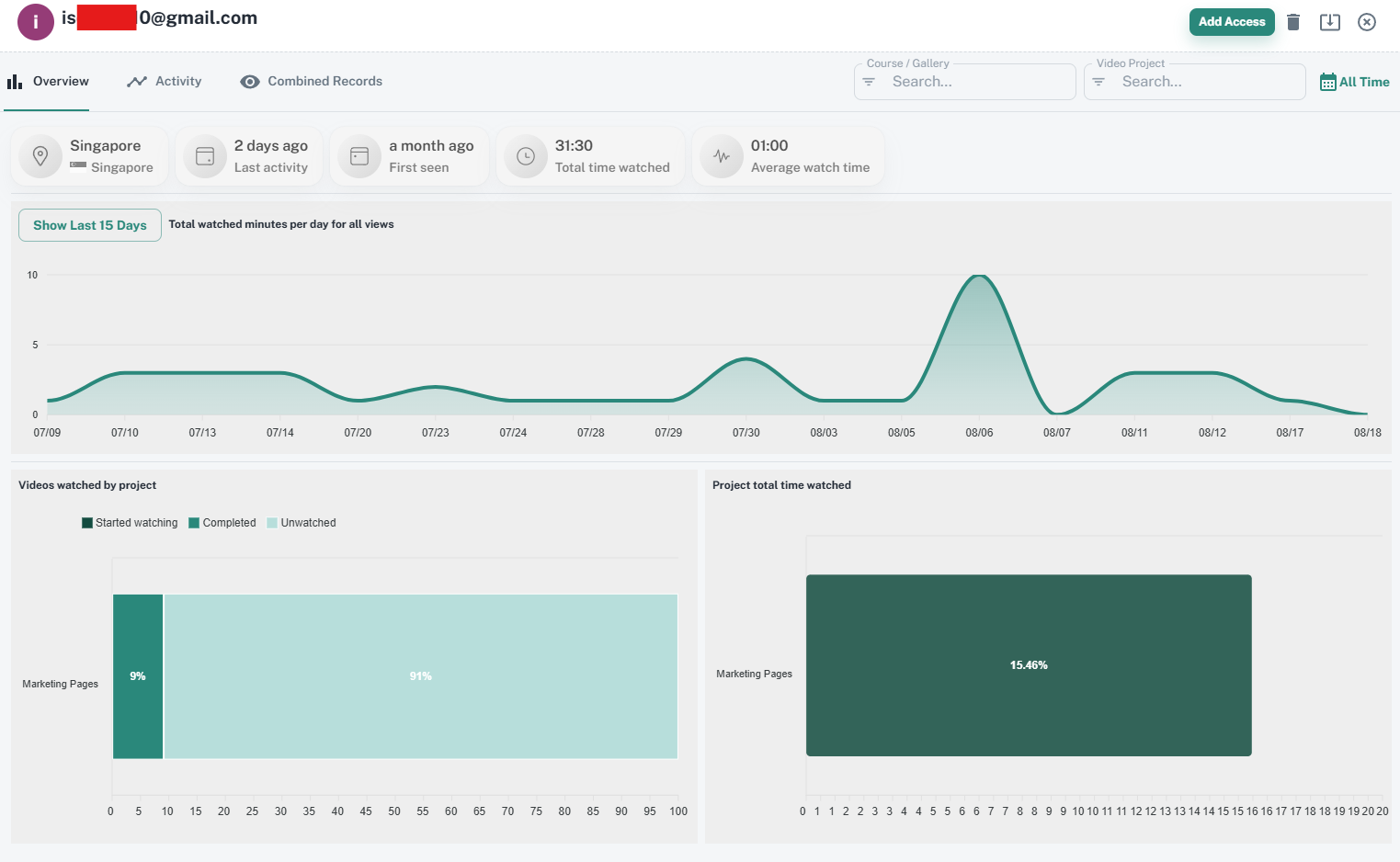
Here is a screenshot of the student overview panel which details the activity by project and overall statistics like total watch time:
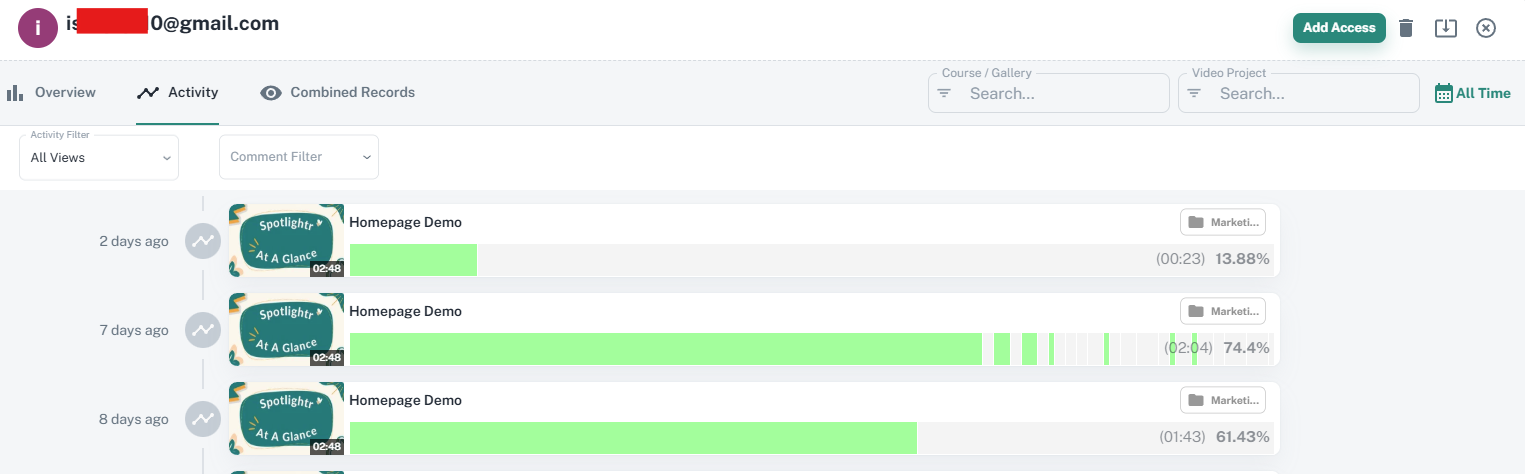
Here is a look at the student activity which details the video(s) watched and the heatmap of each view:
Troubleshooting: Why Videos Won’t Load or Play in LearnDash
When a video refuses to load on a LearnDash lesson, the cause is almost always one of these five issues:
Embed code problems. Modifying the embed code provided by your host – removing script tags, changing classes, or stripping attributes – can break both playback and event tracking. Always use the exact embed code or shortcode block provided. If your host offers a dedicated WordPress plugin, use it rather than pasting raw HTML.
Domain restriction and referrer policy conflicts. If your video host enforces domain restriction, your site must be on the allow-list. But certain WordPress security plugins or server configurations set a restrictive referrer-policy header that strips the domain information the host needs to verify the embed. Wistia’s documentation specifically warns that certain referrer-policy settings break their domain restriction checks. Verify your site’s referrer policy headers if videos load in preview but fail for logged-in users.
Browser compatibility. Some older browsers do not support HLS streaming natively on desktop without a JavaScript fallback player. If students report issues on specific browsers, ensure your host’s player includes HLS.js or an equivalent polyfill for smooth playback across all environments.
CDN, firewall, or hotlink protection misconfiguration. If your WordPress site uses a CDN (like Cloudflare) with aggressive caching or hotlink protection rules, those rules can block the cross-domain scripts or video segments your player needs to load. CORS misconfigurations cause similar failures. Check your CDN’s security settings and ensure your video host’s domains are whitelisted.
WordPress plugin or cache conflicts. Optimization plugins that defer JavaScript, lazy-load iframes, or minify scripts can interfere with video player initialization. HTTPS mixed content errors (embedding HTTP video on an HTTPS site) also prevent playback. Test with all optimization plugins temporarily disabled to isolate the conflict.
A systematic diagnosis starts with: check the browser console for errors, verify the embed code is unmodified, confirm domain allow-lists, test with caching/optimization plugins disabled, and verify HTTPS consistency.
Which Video Host Should You Choose for LearnDash?
Choose Spotlightr if you want the right platform for LearnDash integration with per-student tracking, built-in content protection (HLS encryption, domain restriction, watermarking), and marketing features like email capture and in-player quizzes. It is the strongest all-around choice for video hosting for LearnDash paid courses.
Choose Vimeo if professional video appearance matters most, your audience is predictable and small enough to stay within the 2 TB bandwidth cap, and you don’t need automatic video progression or per-student analytics.
Choose Wistia if detailed engagement analytics (heatmaps, viewer drop-off) are your priority, you need marketing automation integrations, and you’re willing to pay premium pricing for a basic video player that excels in analytics but lacks native LearnDash support.
Choose Bunny.net + Presto Player if you’re technically skilled, budget-conscious, and willing to handle signed URLs, streaming zone configuration, and limited analytics in exchange for extremely low cost hosting with native LearnDash video progression.
Avoid YouTube for paid course content. Use it for free hosting of marketing videos, course trailers, and live streaming promotional events – but never for your actual paid content.
Skip self hosting unless you have a single free preview lesson. Uploading videos to your WordPress media library for an entire course will degrade your site performance and expose your video files to trivial downloading.
Consider Amazon S3 + CloudFront only if you have dedicated technical resources, enterprise-scale needs, and the budget for custom player development, transcoding pipelines, and security configuration. For most creators, the overhead is not worth the control.
For most creators selling LearnDash courses, Spotlightr provides the strongest combination of protection, integration, and actionable analytics. LearnDash does not host videos directly – it relies on external platforms – and the platform you choose determines whether your course content stays protected, your progression tracking works, and your student engagement data is actually useful.
Frequently Asked Questions
Can I use YouTube with LearnDash?
Technically, yes – you can embed videos from YouTube into any LearnDash lesson using a standard embed code or URL. But practically, YouTube is unsuitable for paid courses. Unlisted videos can be shared via URL, ads and related videos distract students, and there is no content protection against downloading. Live events and promotional content are appropriate uses; your core paid content is not.
Does video progression work with any host?
No. LearnDash video progression requires the video host to communicate playback events back to the LMS. Currently, automatic progression works natively with Bunny.net (since LearnDash 4.8) and with Spotlightr via its native plugin. Other platform options – Vimeo, Wistia, YouTube, self-hosted, S3 – require custom JavaScript development or simply do not support automatic progression, meaning students must manually mark lessons complete. VdoCipher offers a WordPress plugin for LearnDash integration as well, though its feature set differs.
Can students download my videos?
It depends entirely on your host and plan. With Spotlightr, HLS encryption and access tokens make casual downloading effectively impossible – browser extensions that grab MP4s simply have nothing to grab. Vimeo and Wistia let you disable the download button, but hidden URLs can still be discovered via network inspection. YouTube videos are downloadable with freely available tools. Self-hosted video files are directly accessible from the page source. Even with the strongest protection, screen recording remains possible – which is why dynamic watermarking exists as a deterrent, not as absolute prevention.
Will video hosting slow down my site?
External video hosting (Spotlightr, Vimeo, Wistia, Bunny.net) has minimal impact on your WordPress site’s performance because the video is streamed from the host’s servers, not yours. Self-hosting videos on WordPress can slow down your site significantly – large videos consume server bandwidth, CPU, and memory, degrading performance for every visitor. Even a few concurrent viewers streaming large videos from a shared hosting plan can make your entire site unresponsive.
Do I need a CDN for video hosting?
For global audiences, yes. A CDN (Content Delivery Network) stores copies of your video at edge servers worldwide, reducing buffering and load times for students regardless of location. The good news: Spotlightr, Vimeo, Wistia, and Bunny.net all include CDN delivery by default. Amazon CloudFront is itself a CDN. The only scenario where you lack CDN coverage is self hosting on a standard web hosting plan – which is one more reason to avoid it for video content.
Video Hosting For eLearning That Does It All
Spotlightr is built for learning. We’ve got the branding, customization, and marketing features that you need to build your enrollments expand your course offerings.
Try it for 14 days and see why we are the obvious choice
for your courses. No credit card required.

Bill is the founder of Spotlightr, a video platform used by course creators, membership sites and marketers who need their video hosted properly rather than uploaded somewhere and hoped for. He writes about instructional video from the inside — what creators actually publish, where students actually stop watching, and what the platforms in this category actually charge. He’s currently building Spotlightr Courses, a course product built around the video rather than bolted on top of it.